
Stay in PowerPoint and Slides, or open a canvas: Plus AI vs Snapdeck
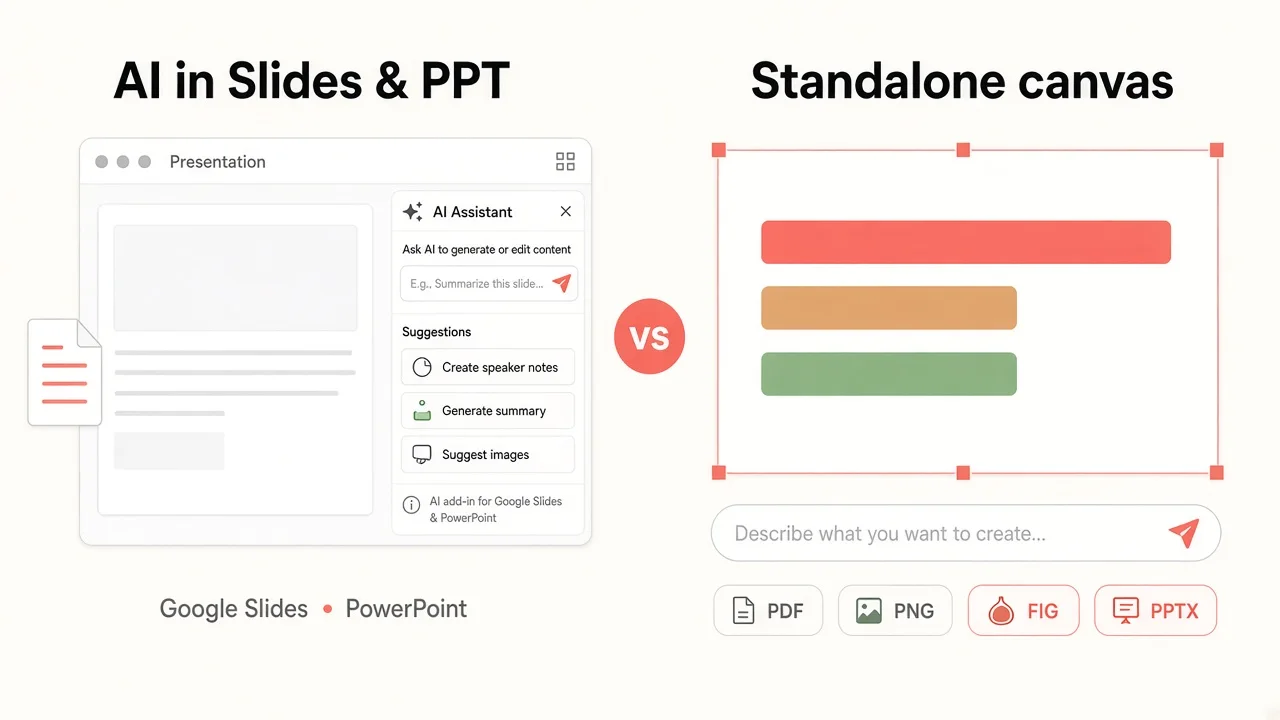
If you already live in PowerPoint or Google Slides, an add-on that builds slides in place sounds tempting. That is Plus AI’s pitch. Other days you just want a deck fast and a Figma or PPTX handoff. Snapdeck is closer to that.
This post splits them with one question: does the AI live inside the app you already use, or on its own canvas? There is no ranking here. 🙂
Plus AI details come from its homepage, pricing page, and guide, checked on 2026-10-14. We did not capture the signed-in PowerPoint or Google Slides add-on. Snapdeck details come from Pro account screens the same day plus the features and pricing pages.
They start in different places
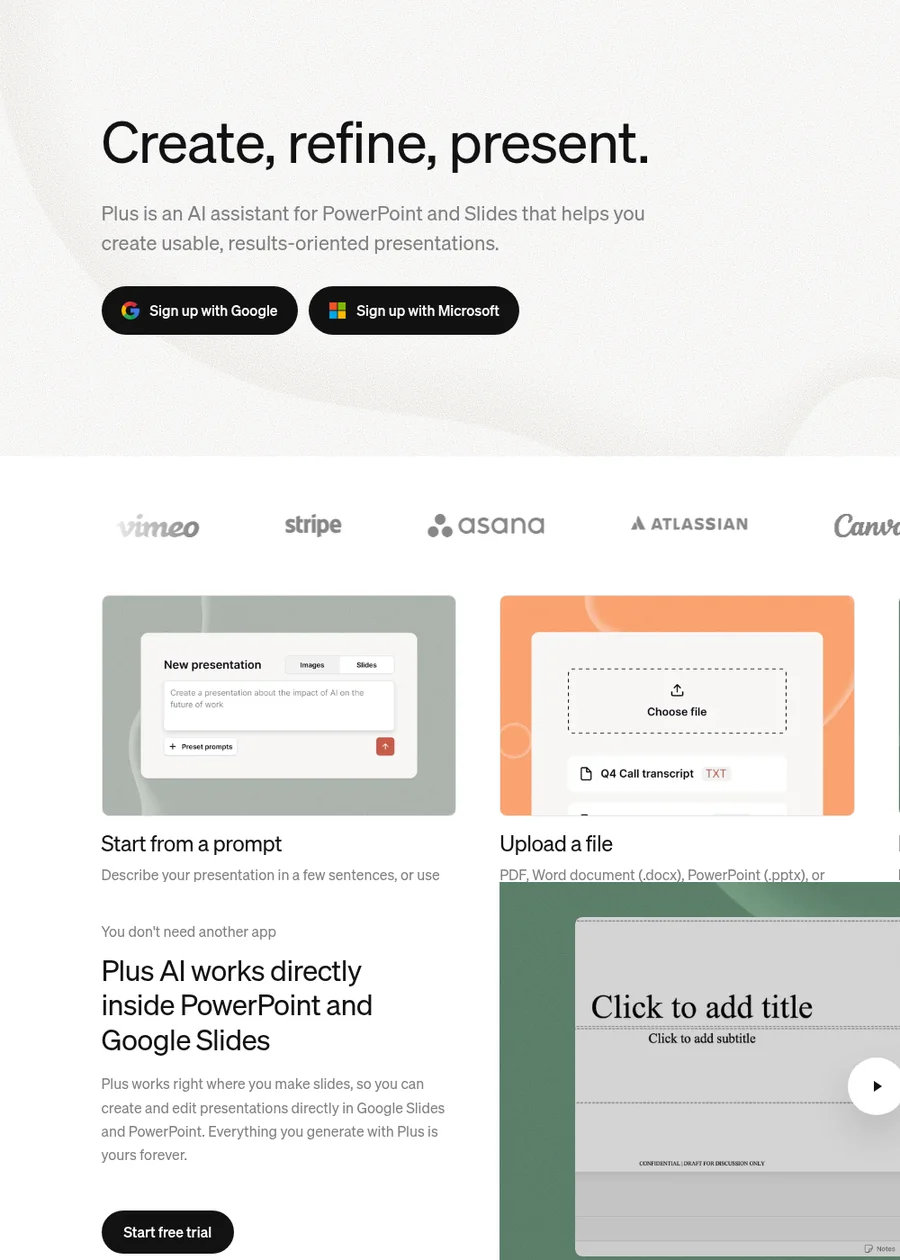
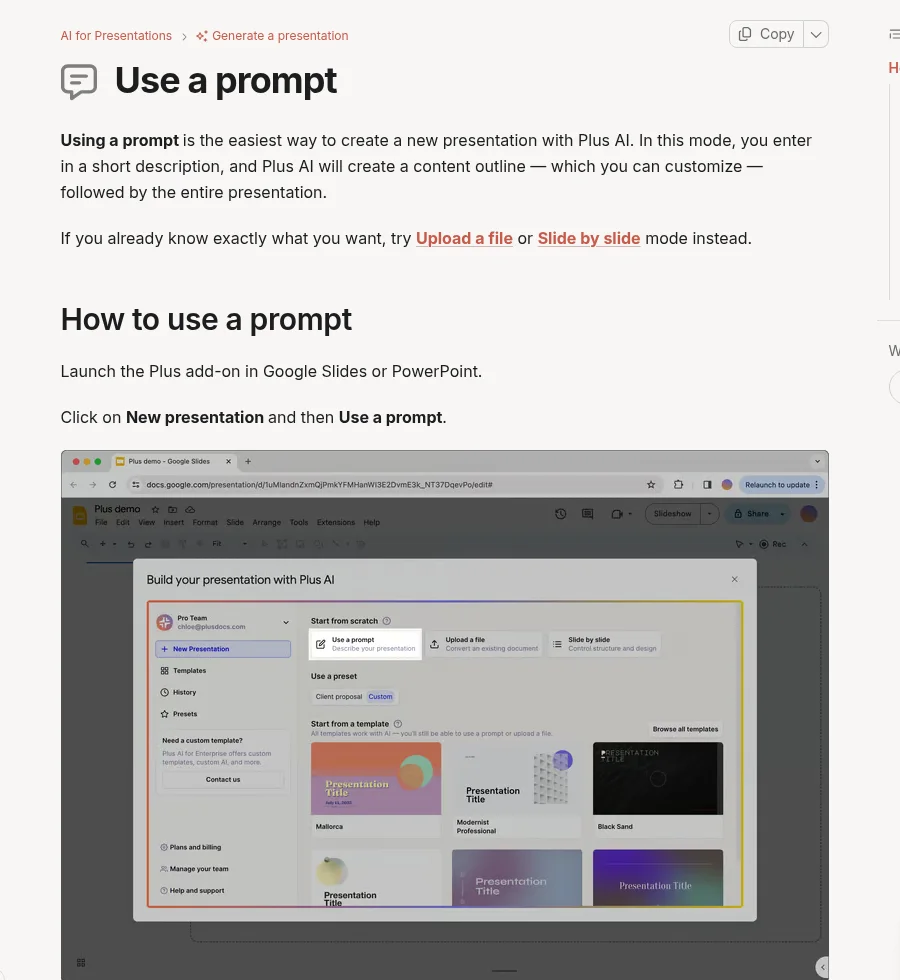
Plus AI’s use a prompt guide describes this flow. Open the Plus add-on in Google Slides or PowerPoint, choose New presentation → Use a prompt, enter a short description, review and edit the outline, then generate. The same docs cover upload a file and slide-by-slide mode. The generate overview also points to the web at app.plusdocs.com/presentations/new.
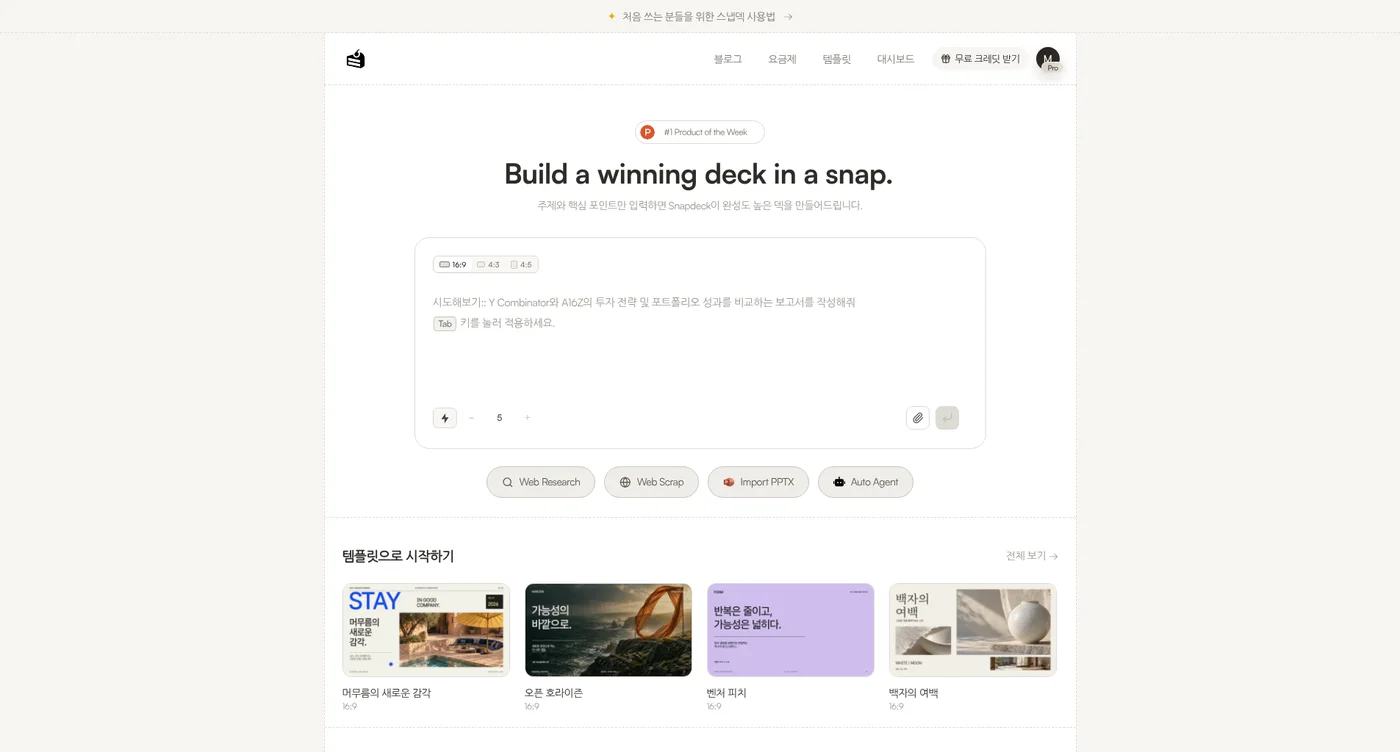
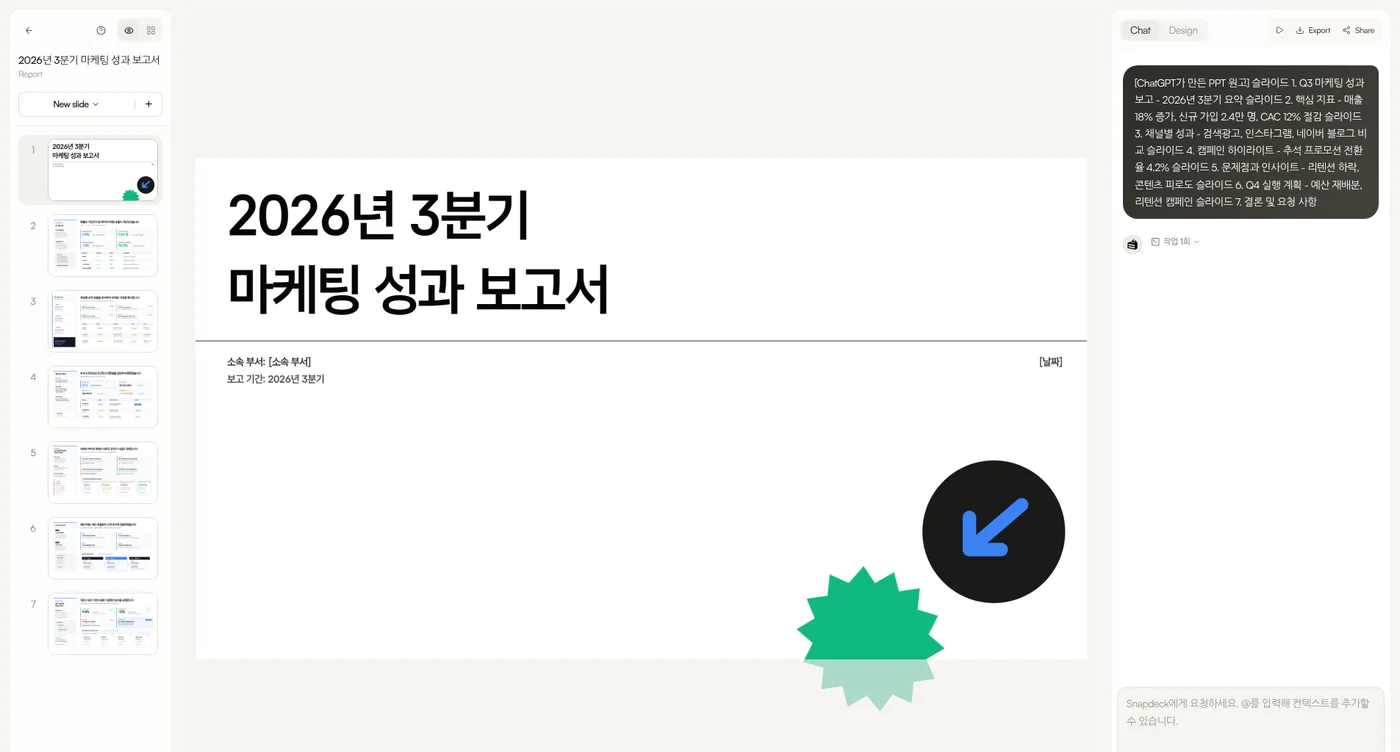
Snapdeck starts in a browser prompt. On home you pick a 16:9, 4:3, or 4:5 ratio and a slide count. Underneath are Web Research, Web Scrap, Import PPTX, and Auto Agent. The features page lists three steps: enter topic and materials, review the outline, then choose a style and theme. Styles include Report, Keynote, Portfolio, and Proposal.
Both show an outline first. What differs is where the file lives from the start: Plus AI inside Slides or PPTX, Snapdeck on a web canvas.
The comparison, in one pass
| Plus AI | Snapdeck | |
|---|---|---|
| Where it runs | PowerPoint and Google Slides add-on. Guide also lists the web app at app.plusdocs.com/presentations/new |
Web browser (snapdeck.app) |
| New deck | Prompt → edit outline → slides. File upload (Pro+). Slide-by-slide mode | Prompt, ratio, slide count, attachments, Web Research, Web Scrap, Auto Agent. Outline before design |
| Existing files | Upload to Remix layouts or generate a new deck. Docs say images, diagrams, and charts are not extracted from documents. Agent options allow up to 10 reference files (Pro+) | Import PPTX: keep editing, or use as a reference |
| How you edit | Insert, Rewrite (tone, length, translate), Remix (layout, Default/Strict). Remix all: up to 30 slides | Direct edit + Chat. Select an area, ask AI, compare before applying |
| Languages | Languages guide: prompts and outputs in “most languages”; set output language; translate via Rewrite. No Korean-named list found | Captured in Korean UI. No official generation-language list found |
| Working together | After generation, normal Slides/PowerPoint sharing and co-editing | Has Share. Real-time co-editing not verified |
| Export | Native PPTX / Google Slides from the start (homepage FAQ mentions its own Open XML renderer). No Figma (.fig) in the public materials we checked | PDF, PNG (per slide), Figma (.fig), PowerPoint (.pptx) |
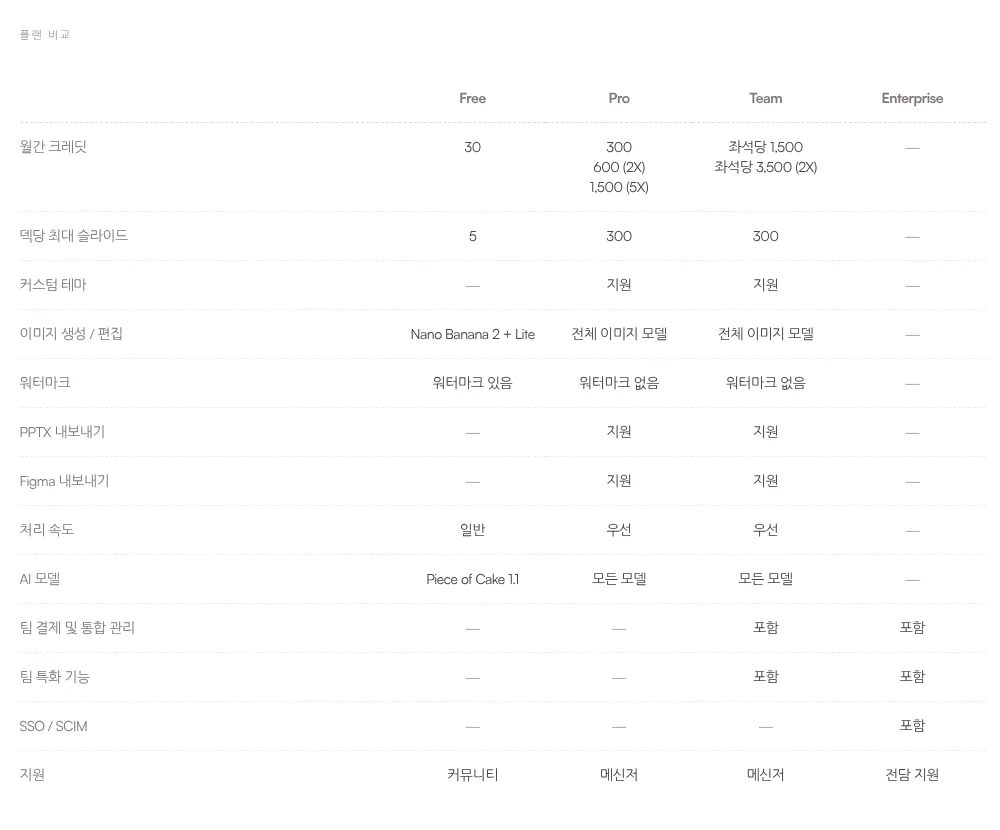
| Slide limits (docs) | Prompt mode guide: about 20 slides. Upload mode guide: about 30. Split into chapters for longer decks | Pricing table: Free 5 slides/deck; Pro and Team 300 |
Where Plus AI fits: the file must be Slides or PPT from the start
Plus AI’s strength is that the output already lives in the app your team uses.
- Native files. The homepage FAQ says it builds native PPTX with its own Open XML renderer and works with Google Slides. Colleagues keep editing without a separate export step.
- Outline then generate. The prompt guide lets you edit titles and delete slides in the outline. Themes and custom themes (Pro) set look and feel.
- Remix and Rewrite. Fit text into layouts (Remix) or change tone and translate (Rewrite). Remix all caps at 30 slides.
- Brand. Per pricing, Team adds logo, colors, fonts, presets, and custom instructions. Enterprise covers org templates and asset libraries.
- Security note. The homepage FAQ mentions SOC 2 Type II.
If decks already live in Google Workspace or Microsoft 365 and you do not want another web app, Plus AI is lower friction.
Where Snapdeck fits: build on a canvas, then hand off the file
Snapdeck focuses on making a deck on the web and choosing how to hand it off.
The features page describes three edit paths: direct Figma-style editing, AI chat, and selecting an area to change. You compare before applying. You can also regenerate designs from the same outline.
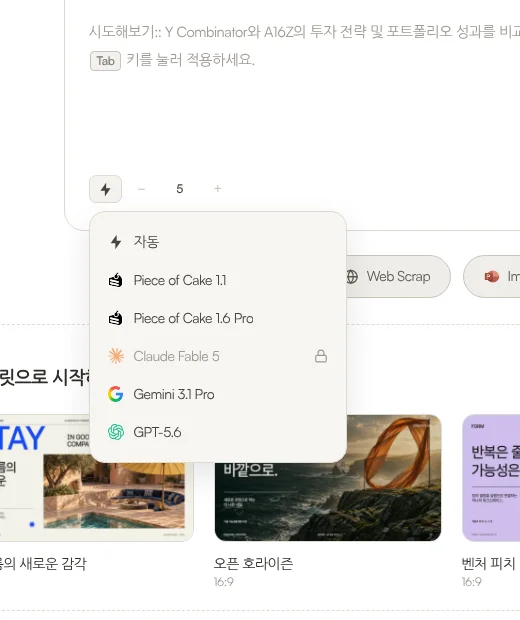
The model list opened from the home prompt showed Auto (자동), Piece of Cake 1.1, Piece of Cake 1.6 Pro, Claude Fable 5 (locked), Gemini 3.1 Pro, and GPT-5.6. Available models depend on the plan.
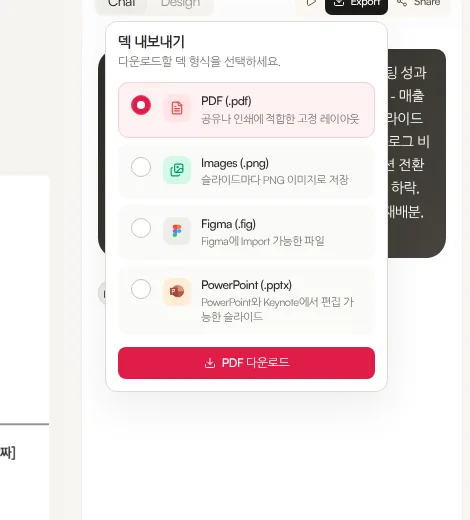
Export lists PDF, Images (.png), Figma (.fig), and PowerPoint (.pptx). A Figma handoff path did not appear in the Plus AI public materials we checked.
To be honest: the features FAQ asks you to check fonts and layout after PPTX export. Share exists, but real-time co-editing and comments were not verified here, and Free has no PPTX or Figma export.
Languages: separate “most languages” from “Korean UI”
Plus AI’s languages guide says it supports prompts and outputs in most languages. You can set an output language when generating, and use Rewrite to translate. The guide’s example is English → Spanish. We did not find an official list that names Korean.
Snapdeck is built by a Korean team (features page: “Built by a Korean team 🇰🇷”), and these captures use the Korean UI. We still found no official list of generation languages. For a Korean deck, a quick prompt test in each product is the safest check.
Cost: add-on subscription vs canvas subscription
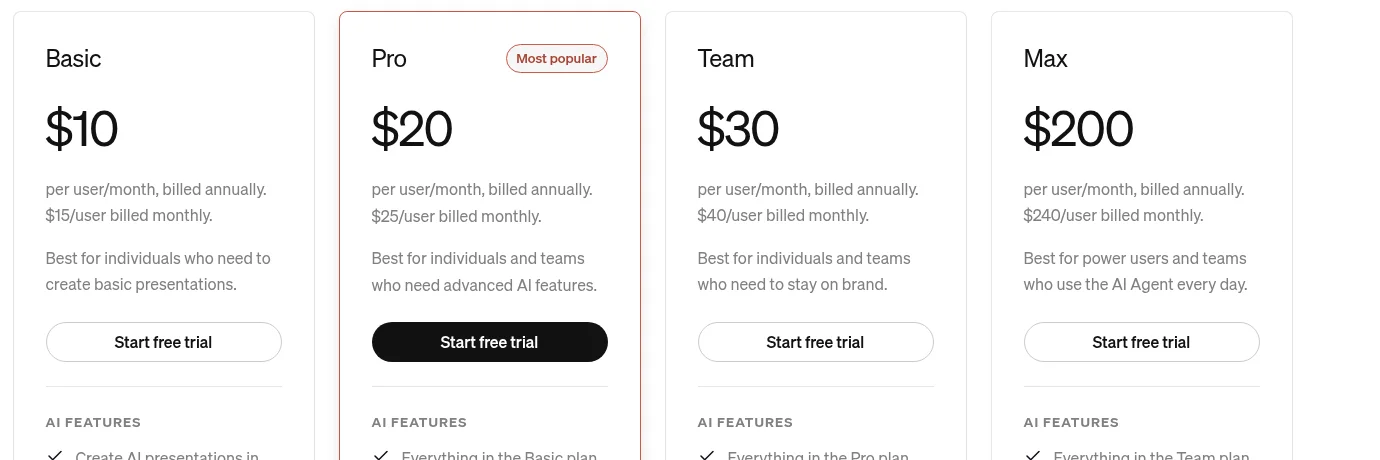
Plus AI pricing (2026-10-14, USD, annual rates): Basic $10/user/month ($15 monthly), Pro $20 ($25), Team $30 ($40), Max $200 ($240). Paid plans start with a 7-day trial (1,000 credits, card required). Credits: Basic 1,500 / Pro 3,000 / Team 6,000 / Max unlimited; the guide says a typical task uses about 40–170 credits. Document uploads, long prompts, and AI images start at Pro; branding and presets at Team. One subscription covers both Slides and PowerPoint.
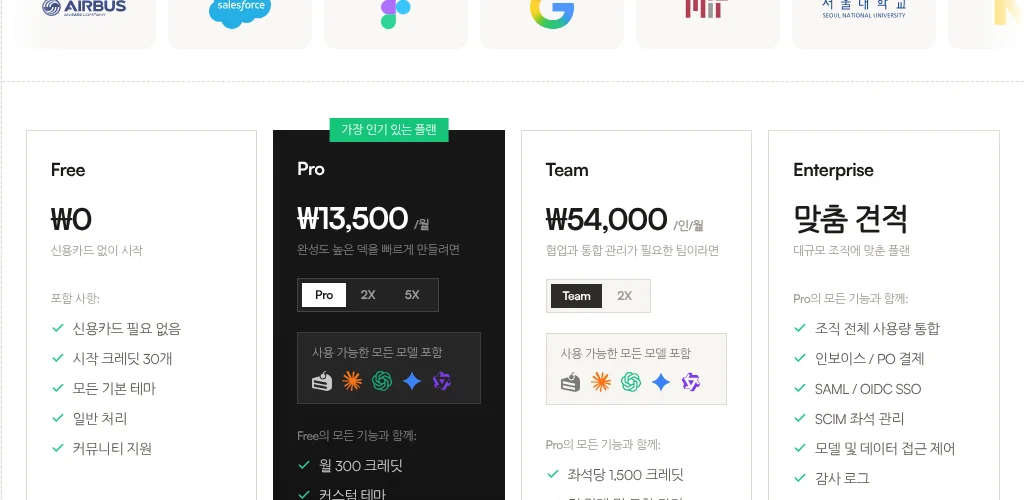
Snapdeck pricing (Korean UI capture, 2026-10-14): Free ₩0 (30 starter credits, 5 slides/deck, watermark, no PPTX or Figma), Pro ₩13,500/month (300 credits, with 2X and 5X options), Team ₩54,000/user/month (1,500 credits per seat), Enterprise custom. Per the comparison table, custom themes and PPTX/Figma export open on Pro and Team. (US-dollar amounts on the English pricing page can differ by locale.)
If you only need Slides or PowerPoint, Plus AI avoids a file move. If you need Figma (.fig) or a web canvas, Snapdeck is closer. Both use credits and slide caps—match them to how long your decks usually are.
Using both together
You do not have to pick one.
- Draft in Snapdeck from a topic or manuscript; tidy outline and style.
- Export PowerPoint (.pptx). Check fonts and layout once.
- Keep editing with colleagues in PowerPoint or Google Slides. If you need a big layout pass inside that file, Remix or Rewrite in Plus AI can fit—when you have that subscription.
If the deck must match a Slides or PPT template from the first minute, start in Plus AI alone.
Which one to open
Plus AI fits when
- The deliverable must be Google Slides or PowerPoint from the start, edited inside those apps.
- You want Remix for layouts or Rewrite for tone and translation.
- You would rather add an add-on than open another web app.
Snapdeck fits when
- You want outline → style → design on a blank web canvas.
- The handoff is Figma (.fig), or PPTX / PDF / PNG.
- You want to pick among Report, Keynote, Portfolio, and Proposal styles.
Where the scope differs
Plus AI is strong at native Slides/PPTX and in-app collaboration, but the public guides cap generation length (about 20–30 slides depending on mode) and we found no Figma (.fig) export. Snapdeck is strong at canvas editing and Figma/PPTX handoff, but Free blocks those exports and real-time co-editing was not verified.
So
If the deck must live in PowerPoint or Google Slides from the start, Plus AI is the natural fit. If the job is build on the web and hand off as Figma or PPTX, Snapdeck is closer. Need both? Draft in Snapdeck, export .pptx, finish in the app your team already opens.
Want to start a canvas deck from one line? Try Snapdeck. ☺️
Sources: Plus AI home, Plus AI pricing, generate a presentation, use a prompt, upload a file, Remix, Rewrite, languages, plans and billing, Snapdeck features (Korean), Snapdeck features (English), Snapdeck pricing. Plus AI from public pages and guides checked 2026-10-14; signed-in add-on UI not captured. Snapdeck screens captured 2026-10-14 from a Pro account.