Korean templates and free PPTX, or outline → style → Figma handoff: MiriCanvas vs Snapdeck
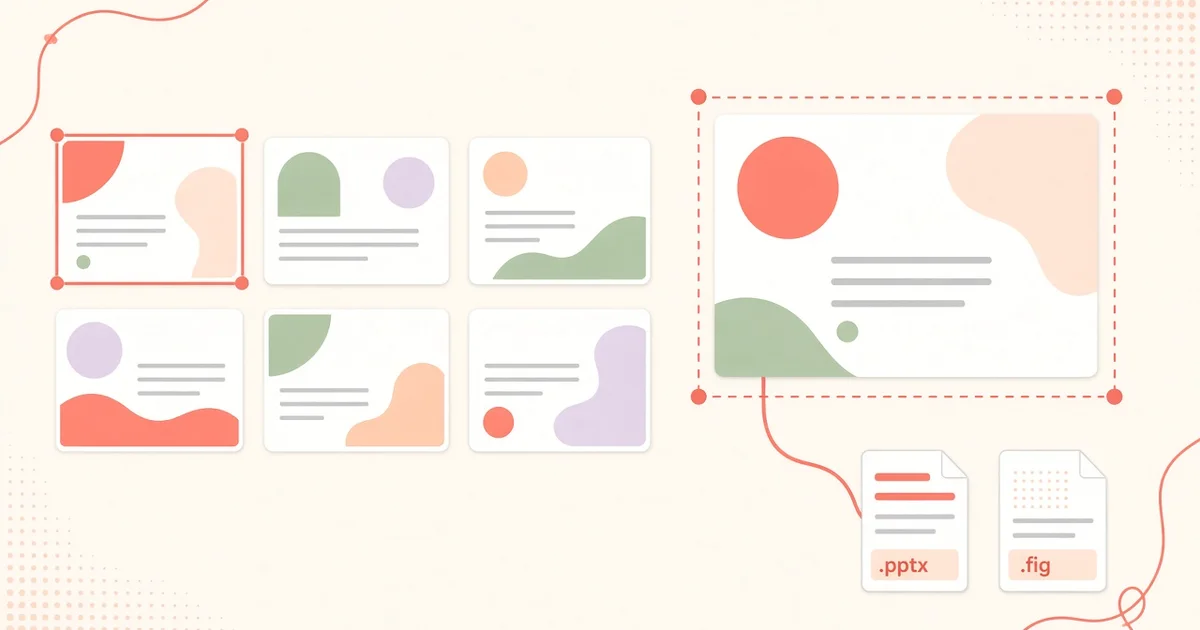
When you make slides in Korean, what trips you up first? Usually the template mood, and Korean fonts.
MiriCanvas addresses that head-on. Its AI drafts a deck on top of Korean-style templates and Korean fonts, and it says you can get a PPTX even on the free plan. Snapdeck goes outline first, then style, then edits on a canvas and hands off to Figma or PPTX.
This post splits them with one question: finish fast from a template and take a PPTX, or polish outline → style → canvas and hand off to Figma too? There is no ranking here. 🙂
MiriCanvas details come from its AI Presentation page, pricing, and the help center's Download Guide and PPT download article, checked on 2026-10-23 (KST). We did not log in—public pages only. Snapdeck details come from a signed-in Pro account in the Korean UI the same day, plus the features and pricing pages.
They start differently
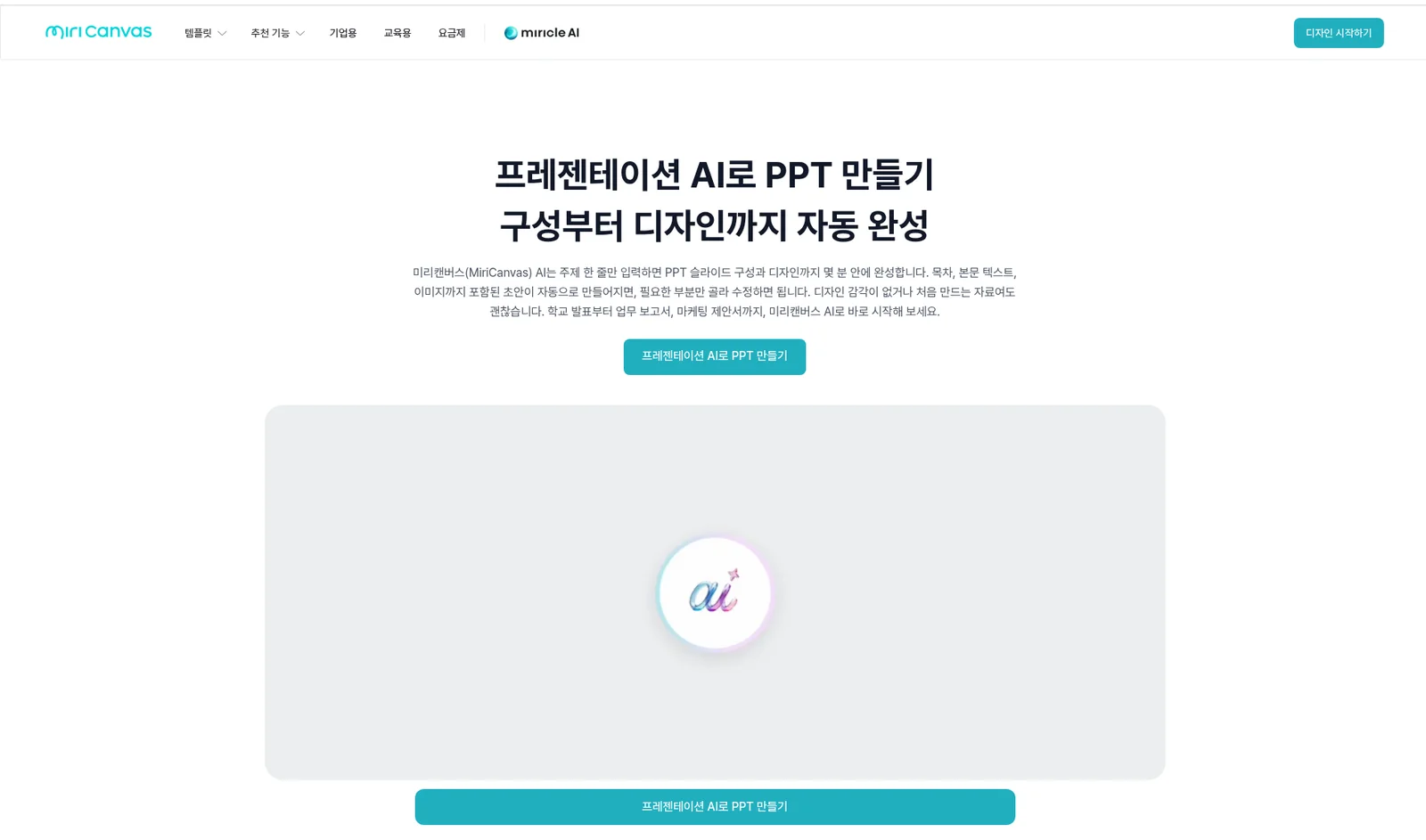
MiriCanvas AI Presentation lives under miricle AI in the top menu. The public flow: enter a topic (or upload a PDF) → pick a design theme → review and edit each page's content → Generate → refine in the editor and export. The page stresses "Korean-style templates," plenty of Korean fonts, and images inserted automatically to fit each page. It also says you won't see broken Korean fonts "like with global AI tools"—that's MiriCanvas's claim, and we didn't test it here.
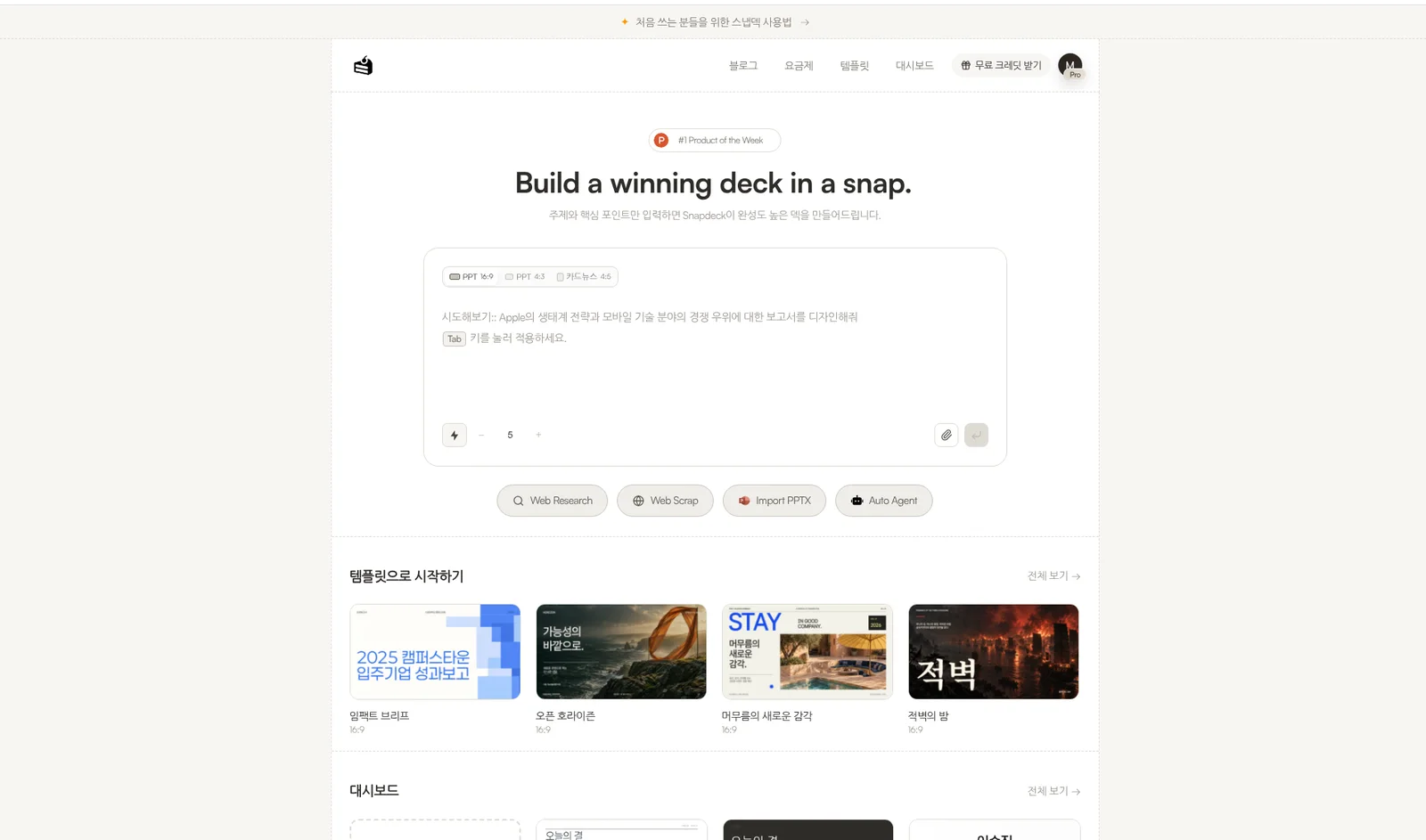
Snapdeck starts in a browser prompt. On home you pick a ratio (PPT 16:9, PPT 4:3, card news 4:5) and a slide count, with Web Research, Web Scrap, Import PPTX, and Auto Agent underneath. The features page lists three steps: enter topic and materials → review and edit the outline → design with a style and theme. Styles are Report, Keynote, Portfolio, and Proposal, and you can build a custom theme from colors, fonts, and a logo, or import one from a website URL.
Both follow "topic → review structure → design," so the flows look alike. What differs is where the design starts and where it goes next. MiriCanvas picks a theme from a big template and asset library; Snapdeck generates slides from a style and theme, then you edit on a canvas and hand off as Figma (.fig) or PPTX.
The comparison, in one pass
| MiriCanvas | Snapdeck | |
|---|---|---|
| Where it runs | Web (miricanvas.com). Many design tools beyond presentations | Web browser (snapdeck.app), deck-first |
| New deck | Topic or PDF upload → theme → edit per-page content → generate | Prompt, ratio, slide count, Web Research, Web Scrap, Import PPTX, Auto Agent. Outline before design |
| Design starting point | Korean-style templates and themes. Pricing card: 50,000+ templates, 350,000+ photos and graphics on Free | Report, Keynote, Portfolio, Proposal styles + themes; custom themes (import from a website URL) |
| How you edit | Drag-and-drop editor, colors/fonts/backgrounds, AI writing (rewrite, spell check), AI images, background removal, and more | Figma-style direct editing + Chat. Drag an area to ask AI, compare before applying |
| Working together | Link sharing and co-editing; help center covers real-time collaborative editing | Has Share. Real-time co-editing not verified |
| Export | PDF, PNG, JPG, PPTX, MP4, GIF. PPTX options: editable text / elements as images / single image. No Figma (.fig) found in public docs | PDF, PNG (per slide), Figma (.fig), PowerPoint (.pptx). PPTX and Figma from Pro |
| What Free covers | 5 AI presentations a month, up to 30 slides, editing and PPTX download included (AI page FAQ) | 30 starter credits, PDF/PNG export, max 5 slides per deck, watermark. No PPTX or Figma export |
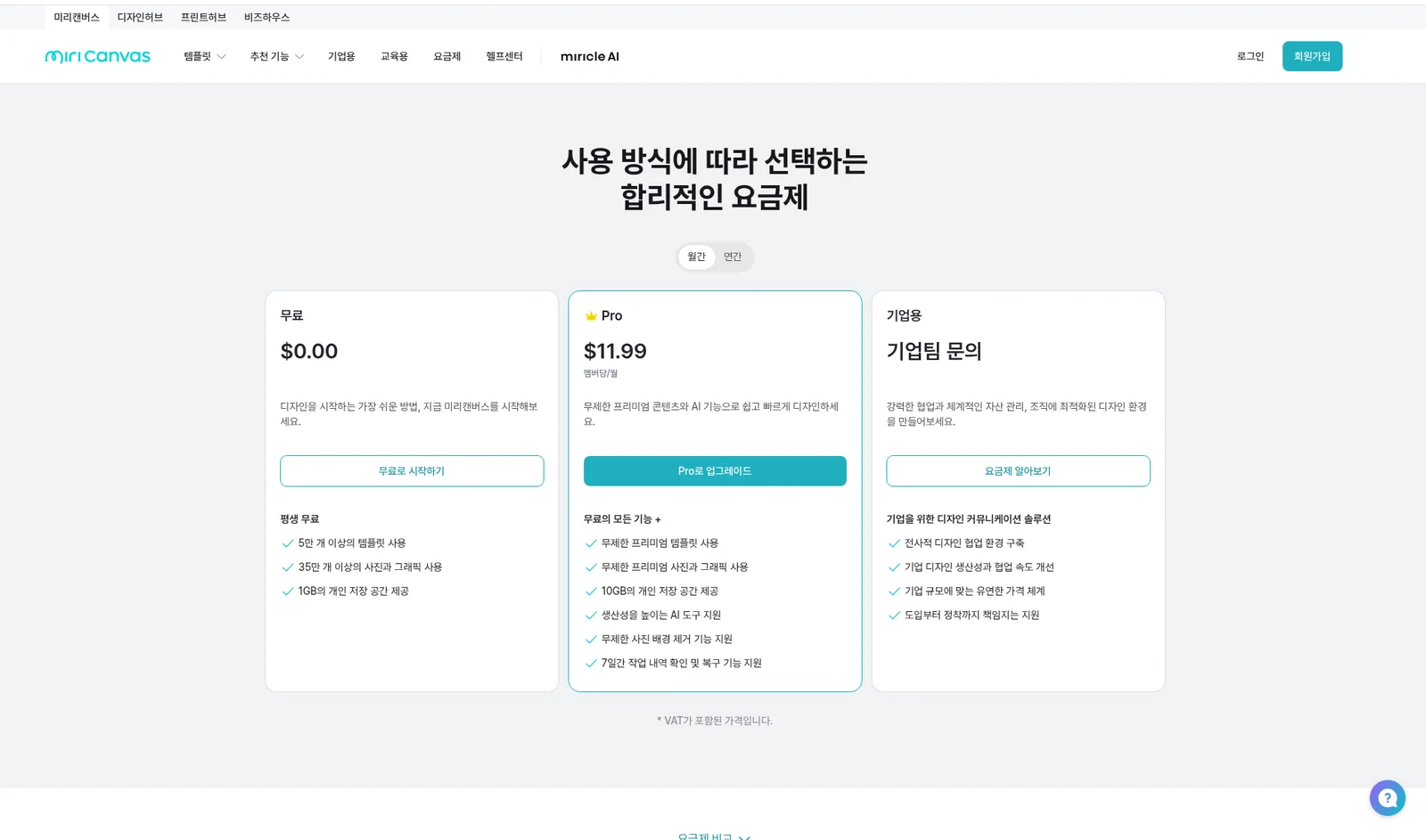
| Paid entry | Pro US$11.99/member/month (monthly) or US$129.99/member/year. Shown in USD from a US IP, labeled VAT included | Pro ₩13,500/month (Korean UI, monthly) |
Where MiriCanvas fits: Korean templates, fast, with free PPTX
MiriCanvas's strength is getting an AI draft on top of templates and assets that feel familiar to Korean users.
- Lots of templates and assets. The pricing card lists 50,000+ templates and 350,000+ photos and graphics even on Free. Pro unlocks unlimited premium templates and assets.
- PPTX on the free plan. The AI page FAQ says free members can generate 5 times a month, up to 30 slides, with editing and PPTX download included. Snapdeck Free can't export PPTX, so MiriCanvas clearly has the edge here.
- Detailed PPTX options. The help article explains three options: editable text, elements converted to images, or a single image. You choose between editing in PowerPoint and keeping the look exactly. It also says you shouldn't pull design elements (fonts, icons, illustrations) out for other documents or redistribute the file as a template.
- Video, GIF, and co-editing. It lists MP4 and GIF export plus link sharing and co-editing, and the help center has a real-time collaborative editing article.
- Training data note. The FAQ says text you enter and data you upload aren't used to train AI models.
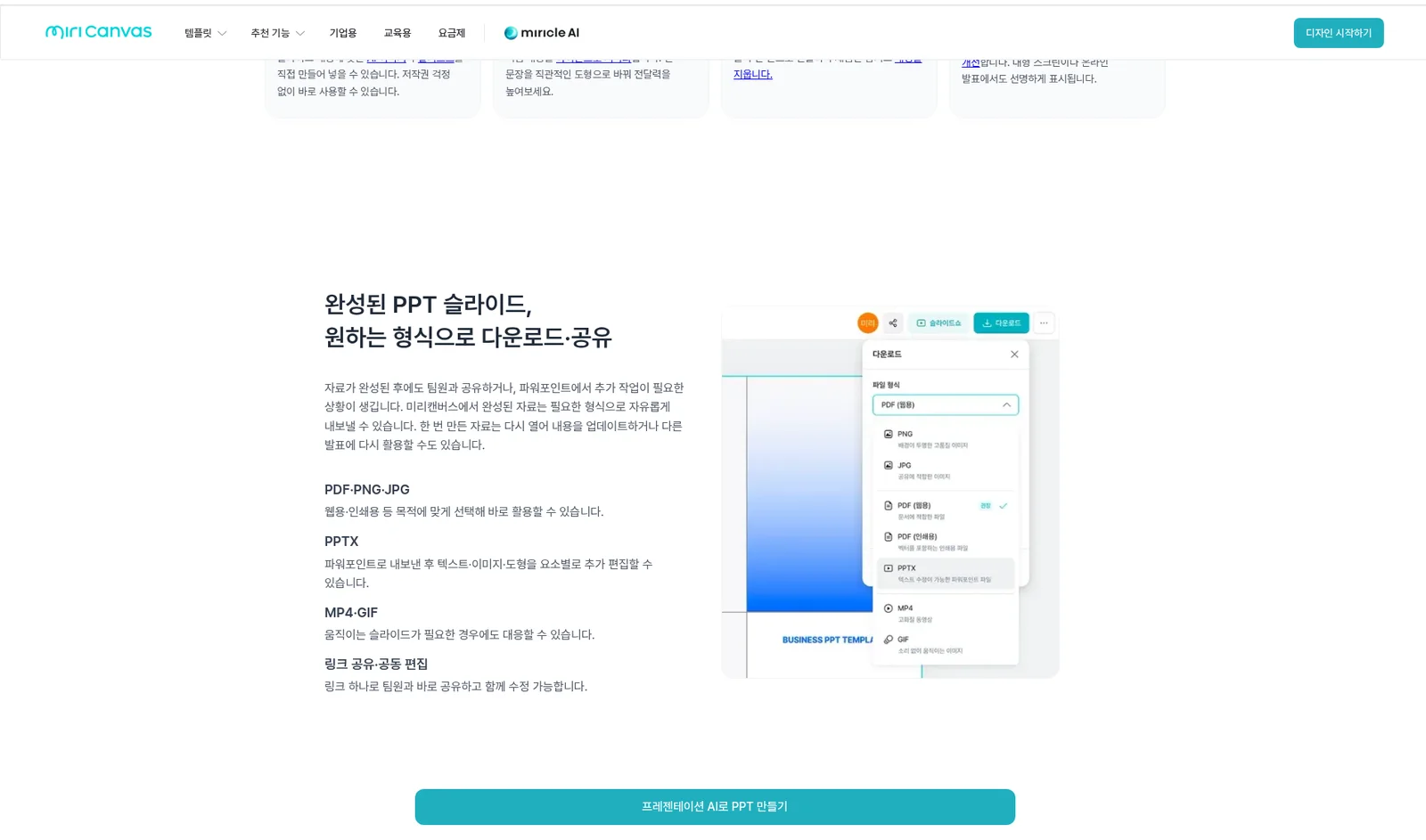
For school presentations, internal reports, or event decks where a Korean template feel matters and you want a free PPTX to finish in PowerPoint, MiriCanvas is close.
To be honest: Figma (.fig) export wasn't in the Download Guide (the format list is PNG, JPG, PDF, PPTX, MP4, GIF), and since we didn't log in, we didn't capture AI output or the editor ourselves. Free generation counts and slide limits are as above.
Where Snapdeck fits: polish the outline, edit on a canvas, hand off to Figma
Snapdeck focuses on making a deck on the web and choosing how to hand it off.
The features page describes three ways to edit: direct Figma-style editing, AI chat, and dragging over just the area you want changed. You compare AI changes before applying them. You can regenerate a design from the same outline, and Import PPTX lets you keep working on an existing file.
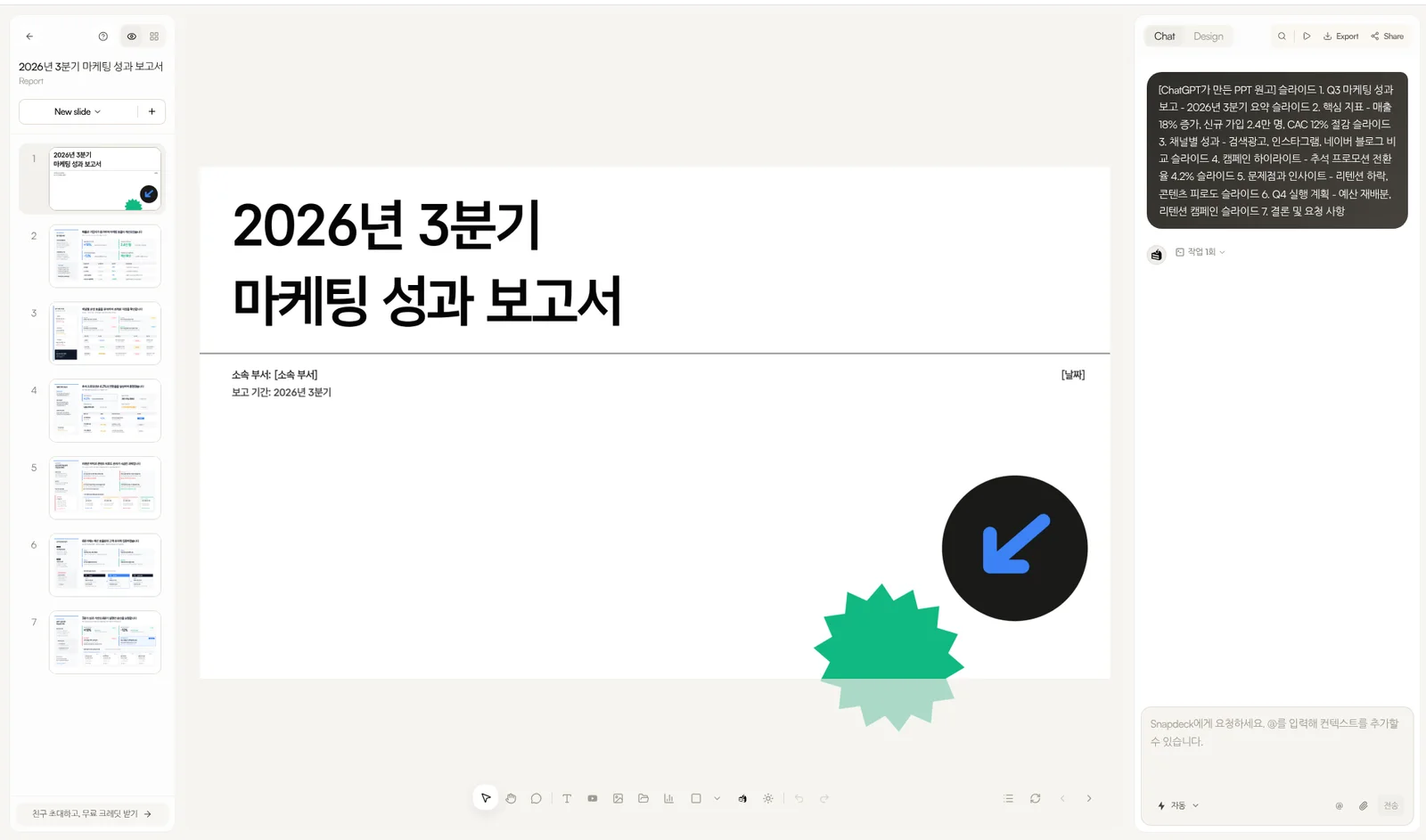
Open Export and "Export deck" lists PDF (.pdf), Images (.png), Figma (.fig), and PowerPoint (.pptx). The Figma item reads "a file you can import into Figma," and PowerPoint reads "slides editable in PowerPoint and Keynote." For teams where a designer keeps refining in Figma, that path makes the difference. The features page asks you to do a final check in your presenting environment after PPTX export.
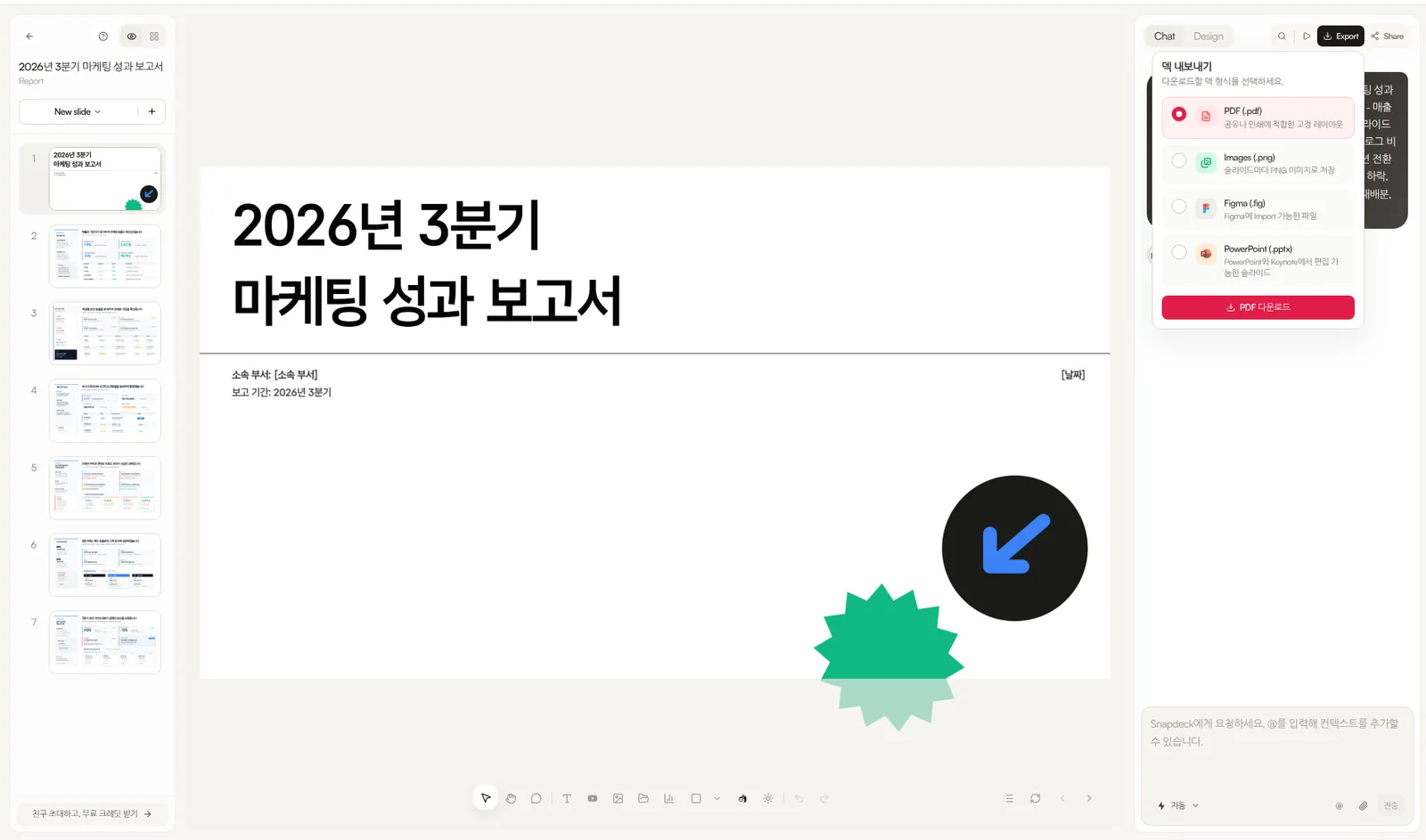
To be honest: Share exists, but real-time co-editing wasn't verified here, and MP4/GIF export isn't in the Export menu. Template and photo library size can't be compared on the same axis as MiriCanvas (the features FAQ says 135 free PPT templates). And Free has no PPTX or Figma export, with a 5-slide-per-deck limit and a watermark.
Cost: how far Free goes, and where paid starts
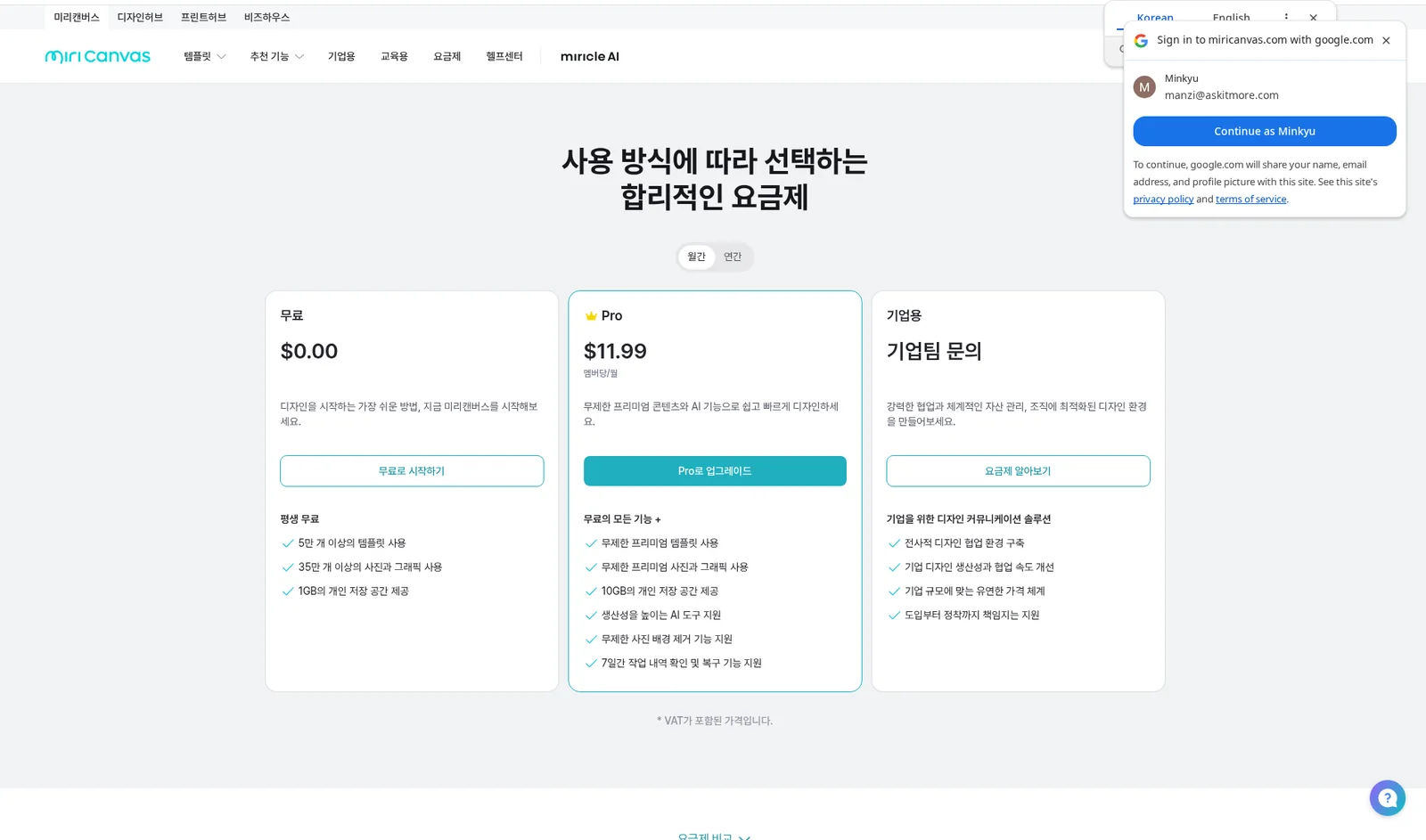
MiriCanvas pricing (checked 2026-10-23) has Free / Pro / Enterprise / Education. Our browser had a US IP, so prices showed in USD: Free $0.00; Pro US$11.99/member/month monthly or US$129.99/member/year ($10.83/month) annually, labeled "VAT included." Enterprise says "contact sales." We did not see KRW pricing for visitors in Korea, so check the pricing page yourself. The Pro card lists unlimited premium templates and assets, 10GB storage, AI tools, unlimited background removal, and 7-day work history restore.
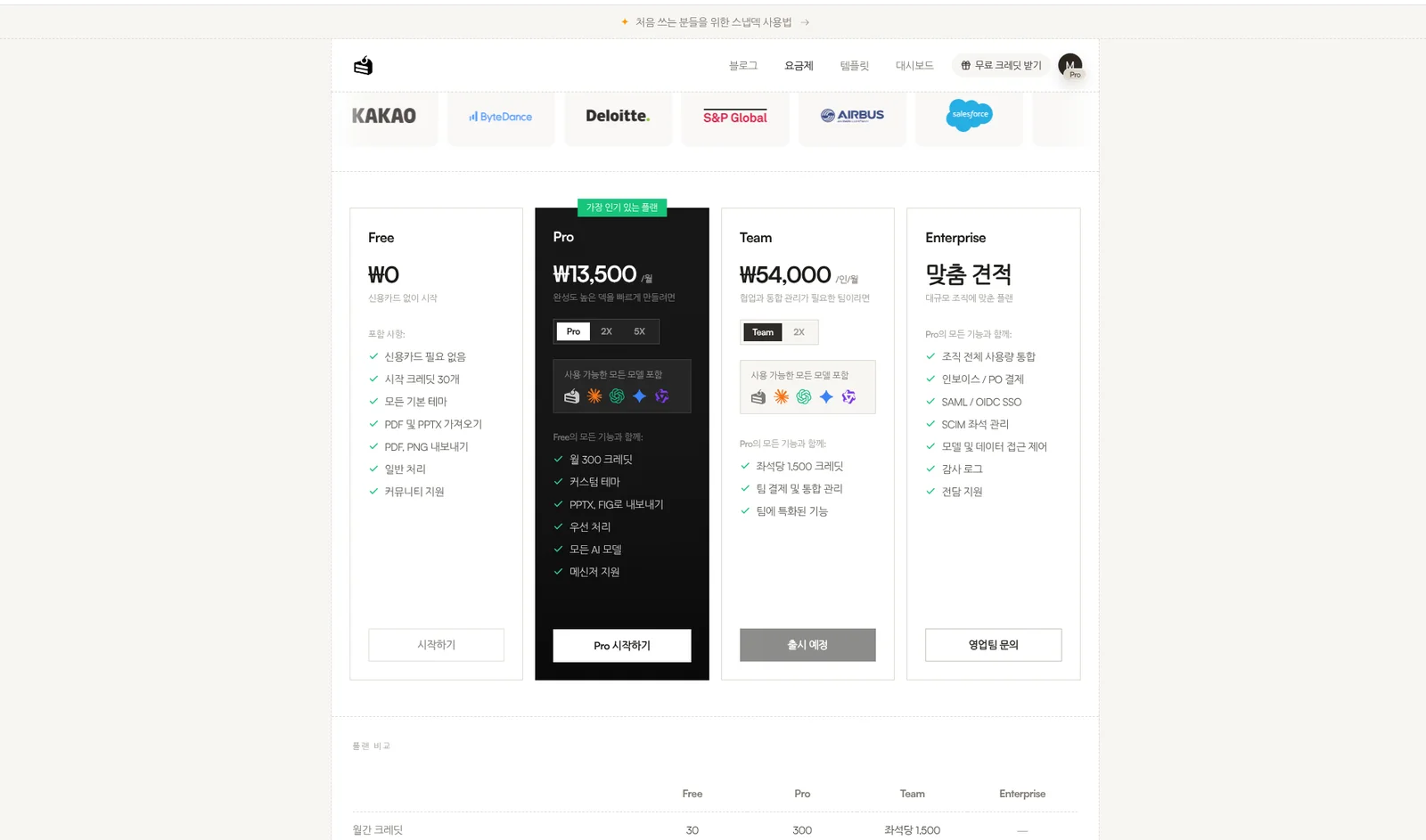
Snapdeck pricing (same day, signed-in Pro account, Korean UI, monthly): Free ₩0 (30 starter credits, PDF/PNG export), Pro ₩13,500/month (300 credits a month, PPTX/FIG export), Team ₩54,000/user/month (button says "coming soon"), Enterprise custom quote. The comparison table shows PPTX and Figma export as — on Free and supported on Pro and Team, with max slides per deck at 5 on Free and 300 on Pro and Team.
In short: if the goal is a PPTX without paying, MiriCanvas Free goes further. If you need a Figma (.fig) handoff or AI area edits on a canvas, look at Snapdeck Pro.
Using both together
You don't have to pick one.
- In Snapdeck, shape the outline from a topic or manuscript, pick a style, and build the draft.
- Export Figma (.fig) for the designer and PowerPoint (.pptx) for presenting. Check fonts and layout once.
- Make off-deck designs like event posters or card news from MiriCanvas templates separately.
And if it's a short deck that a template can finish, starting with MiriCanvas alone is less confusing.
Which to pick
MiriCanvas fits when
- Picking from a Korean-style template and asset library is easiest for you.
- You need AI decks and a PPTX for free (5 a month, up to 30 slides).
- You need MP4/GIF export, link sharing, and co-editing.
Snapdeck fits when
- You want to review and edit the outline first, before design.
- The handoff is Figma (.fig) for a designer.
- You want to drag an area on the canvas, ask AI for a partial edit, and compare before applying.
Watch out for
For MiriCanvas, we found no Figma (.fig) export in public docs, didn't view the signed-in editor this time, and didn't confirm KRW pricing. For Snapdeck, Free blocks PPTX and Figma, there's no MP4/GIF export, and real-time co-editing wasn't verified.
So
If the finish line is fast from a Korean template, with a free PPTX, MiriCanvas is the natural fit. If it's polish the outline, edit on a canvas, and hand off as Figma or PPTX, Snapdeck is closer.
Want to start from one line and shape the outline first? Try Snapdeck. ☺️
Sources: MiriCanvas AI Presentation, MiriCanvas pricing, MiriCanvas Download Guide, MiriCanvas PPT download, MiriCanvas save, share & download help, Snapdeck features, Snapdeck pricing. MiriCanvas from public pages checked 2026-10-23; signed-in UI not captured. Snapdeck screens captured the same day from a signed-in Pro account in the Korean UI.