
All-in-one visuals—or outline, style, then Figma and PPTX: Visme vs Snapdeck
After AI builds a deck, a choice remains. Do you need presentations plus infographics, social, documents, and video in one product—or is polishing an outline and style, then handing off Figma or PPTX, enough?
Visme pitches an AI-powered all-in-one visual content platform: presentations, documents, data visualizations, social graphics, videos, wireframes, and more. Snapdeck is closer to build on a web canvas and hand off the file.
This post splits them with one question: need an all-in-one visual content platform, or a deck-first canvas with outline → style → Figma/PPTX handoff? There is no ranking here. 🙂
Visme details come from its homepage, pricing page, AI Presentation Maker, and AI Design Generator, checked on 2026-10-21. We did not log in—public pages only. Snapdeck details come from a signed-in Pro account Korean UI the same day plus the features and pricing pages.
They finish in different scopes
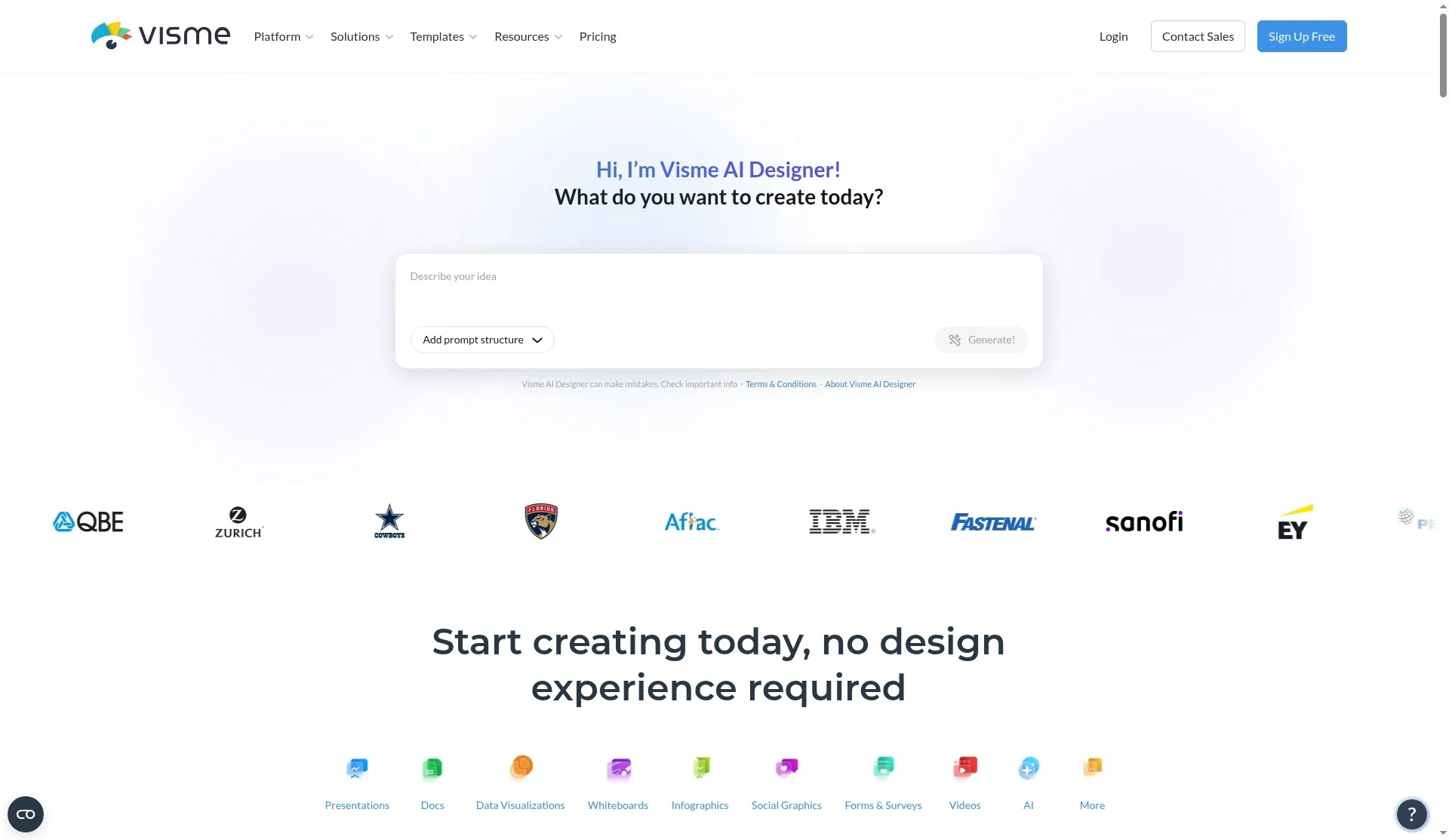
Visme’s homepage calls it an AI-powered all-in-one visual content platform. Content types listed include presentations, documents, data visualizations, social media graphics, videos, and wireframes & mockups; the FAQ also mentions infographics and forms. AI Designer turns a text prompt into a ready-to-use design; Brand Wizard from a website URL and Brand Kit; interactivity and animations (hotspots, hover, clickable menus); collaboration, asset management, and a content calendar. Claims like “Trusted by 35M+” / “35,300,000 users” are Visme site claims, not our ranking.
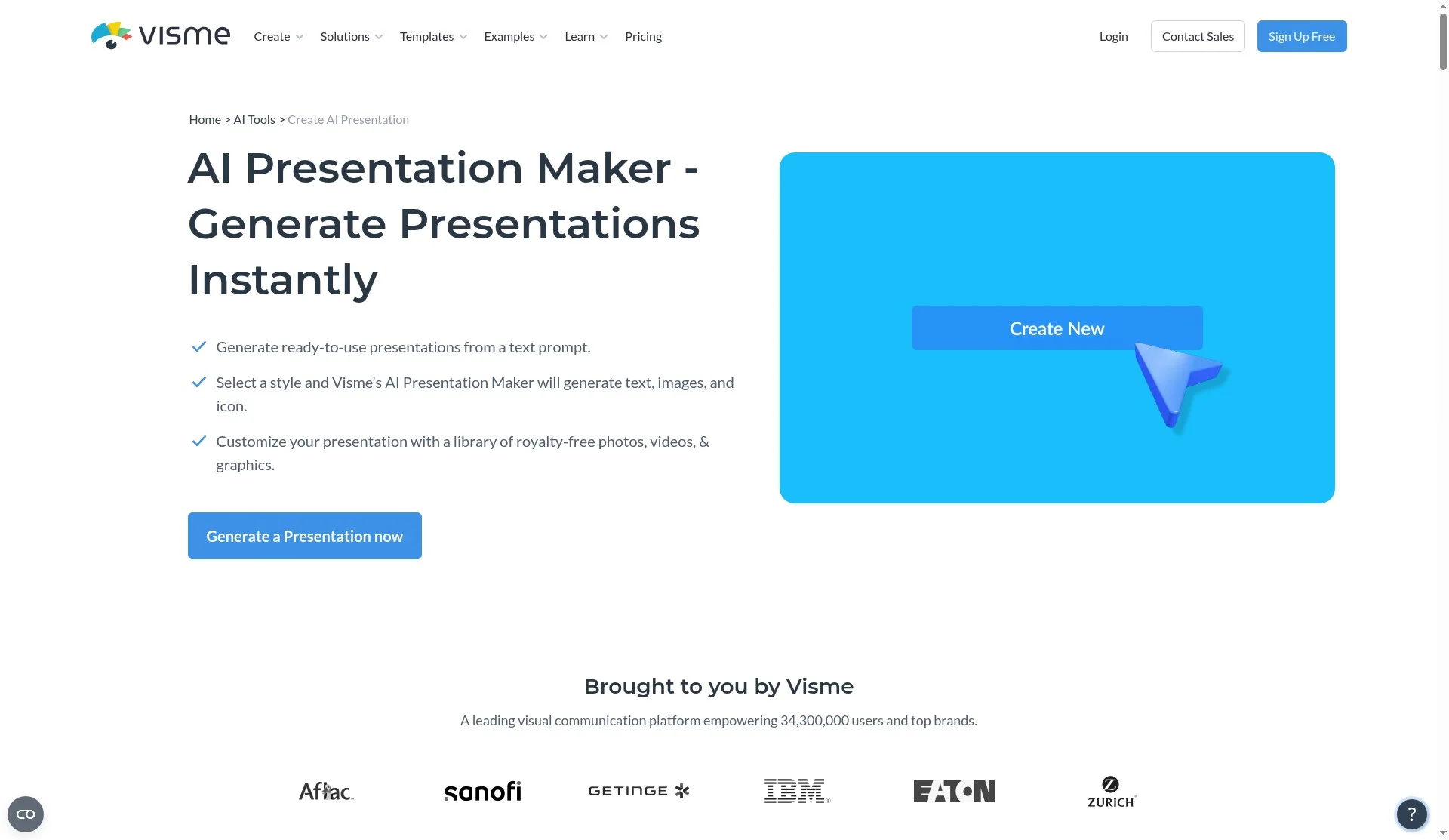
The AI Presentation Maker page describes generate from a text prompt, choose a style, then customize with a royalty-free library. Flow: Create New → Project → Presentations → Generate with AI. Content can come from an uploaded document (.pdf/.docx, max 5MB, max 10 pages) or a URL, with limitations noted on the page. Presenter Studio, Presenter Notes, Presentation Timer, Master Layout, and Slides Library are mentioned. Download/share lists PPTX, PDF, HTML5, social schedule, and password-private projects. We found no Figma (.fig) export on the public pages we checked. We also did not verify a Korean editor UI.
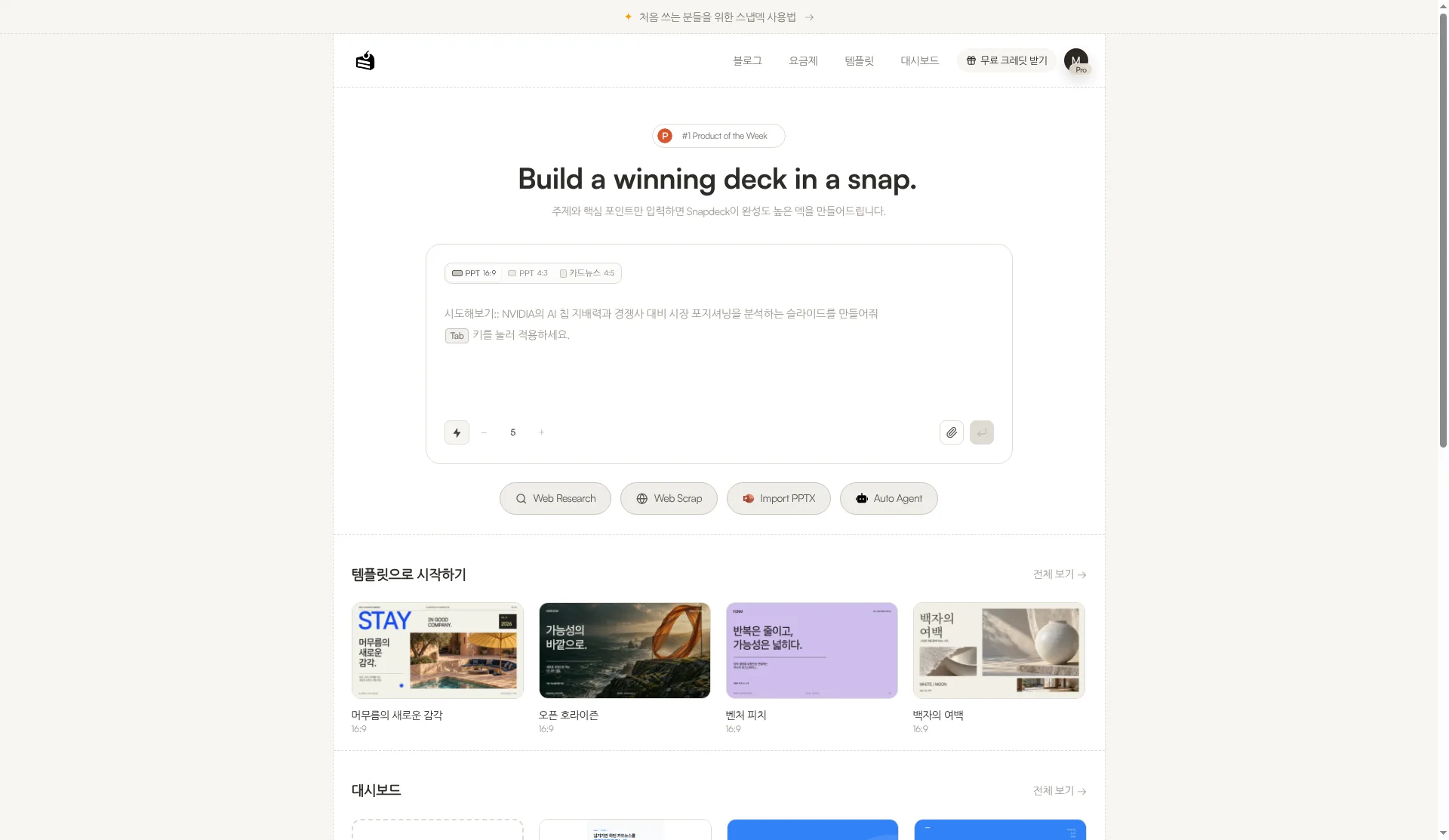
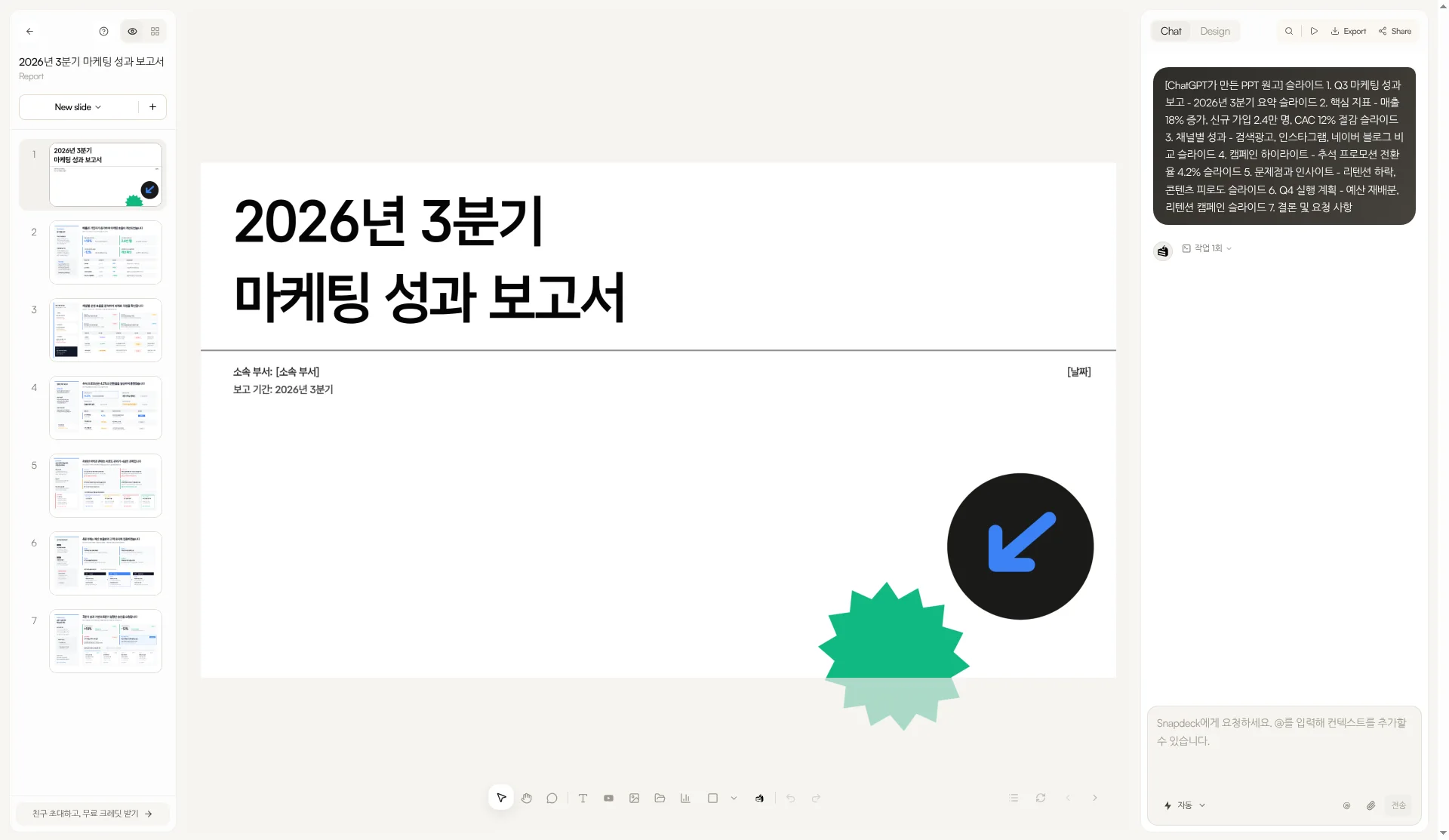
Snapdeck starts in a browser prompt. On home you pick a 16:9, 4:3, or 4:5 ratio and a slide count. Underneath are Web Research, Web Scrap, Import PPTX, and Auto Agent. The features page lists three steps: enter topic and materials, review the outline, then choose a style and theme. Styles include Report, Keynote, Portfolio, and Proposal. Custom themes take colors, fonts, and a logo, or import from a website URL.
Both make decks. What differs is scope beyond the deck. Visme talks presentations plus infographics, social, documents, and video in one platform; Snapdeck is closer to outline → style → canvas edit, then file handoff. We did not find Visme-style all-in-one coverage (infographics, social, video, forms, content calendar, live data-connected charts, and so on) on Snapdeck’s features or pricing pages.
The comparison, in one pass
| Visme | Snapdeck | |
|---|---|---|
| Where it runs | Web (visme.co). “35M+” scale lines cited as site claims only | Web browser (snapdeck.app) |
| New deck / content | AI Designer: prompt → design. Presentations plus documents, social, and more (home / AI page). AI Designer limits include max 10 pages, one project at a time (AI page FAQ) | Prompt, ratio, slide count, attachments, Web Research, Web Scrap, Auto Agent. Outline before design |
| How you edit | Editor, royalty-free library, Brand Kit / Brand Wizard (public copy). Signed-in editor not captured | Figma-style direct edit + Chat. Select an area, ask AI, compare before applying |
| All-in-one scope | Presentations, documents, data viz, social, video, wireframes (home). Interactivity, content calendar, collaboration pitched | Deck-first (Report, Keynote, Portfolio, Proposal). Infographics, social, video, forms, content calendar not found on features |
| Languages | Pricing footer language switcher has no Korean (EN, FR, ES, DE, PT, IT, NL, PL, RU, JA checked). Korean editor UI not verified | Captured in Korean UI. “Built by a Korean team.” No official generation-language list found |
| Working together | Collaboration, comments, asset management (home). Do not overclaim real-time multiplayer | Has Share. Real-time co-editing not verified |
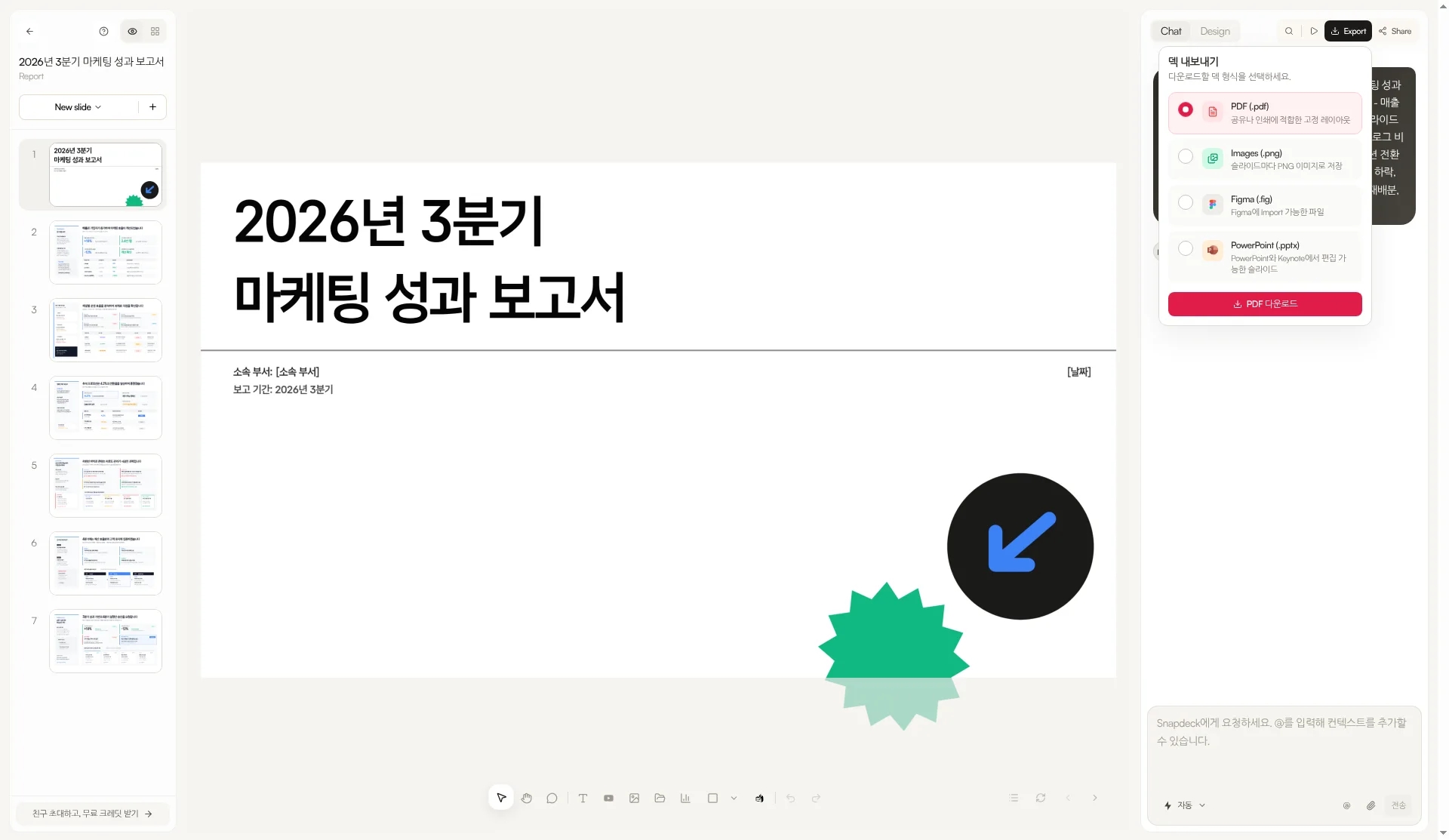
| Export | AI page: PPTX, PDF, HTML5, social schedule, and more. No Figma (.fig) found on public pages. PPTX and similar on pricing cards from Business (see pricing) | PDF, PNG (per slide), Figma (.fig), PowerPoint (.pptx) |
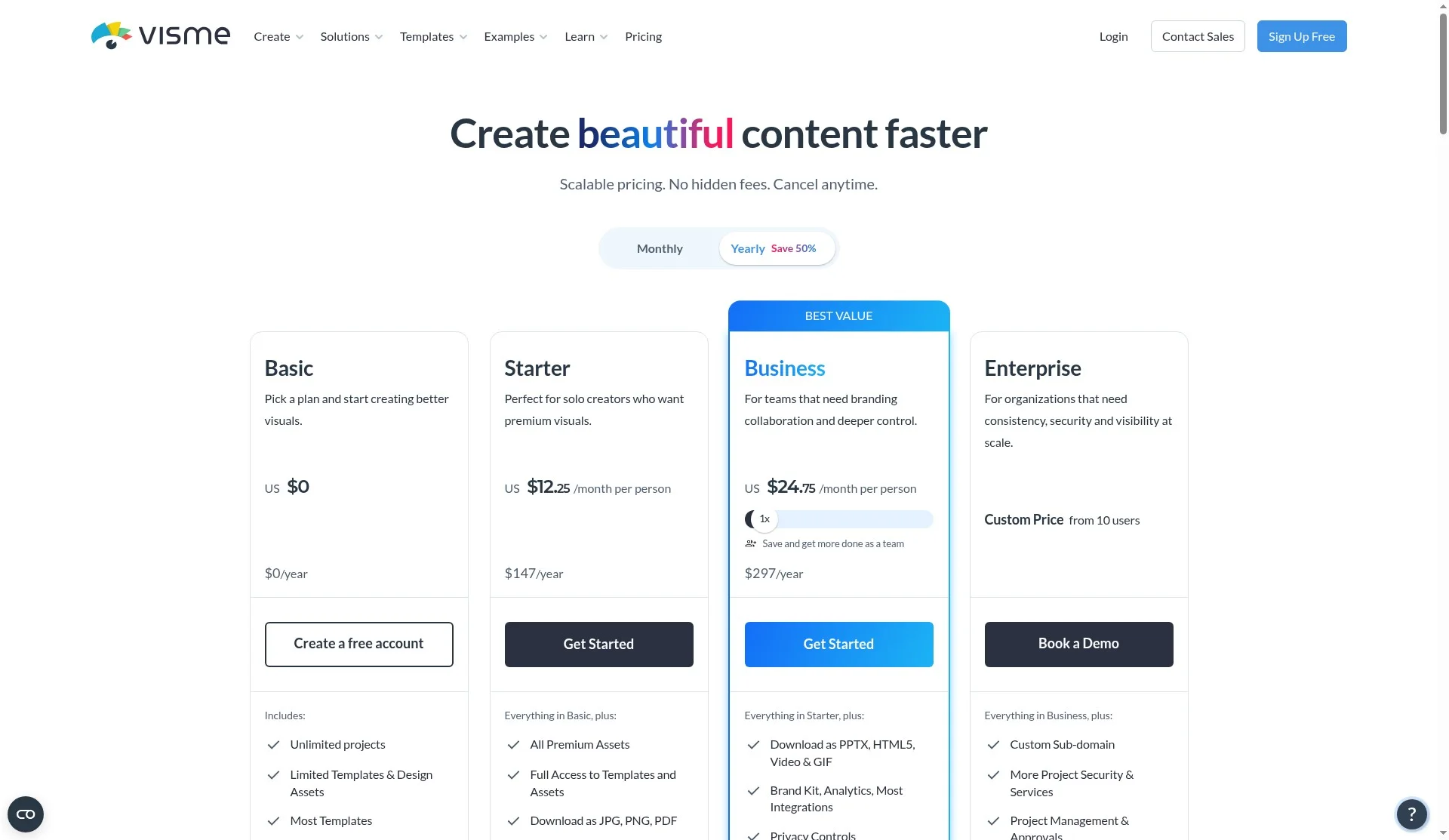
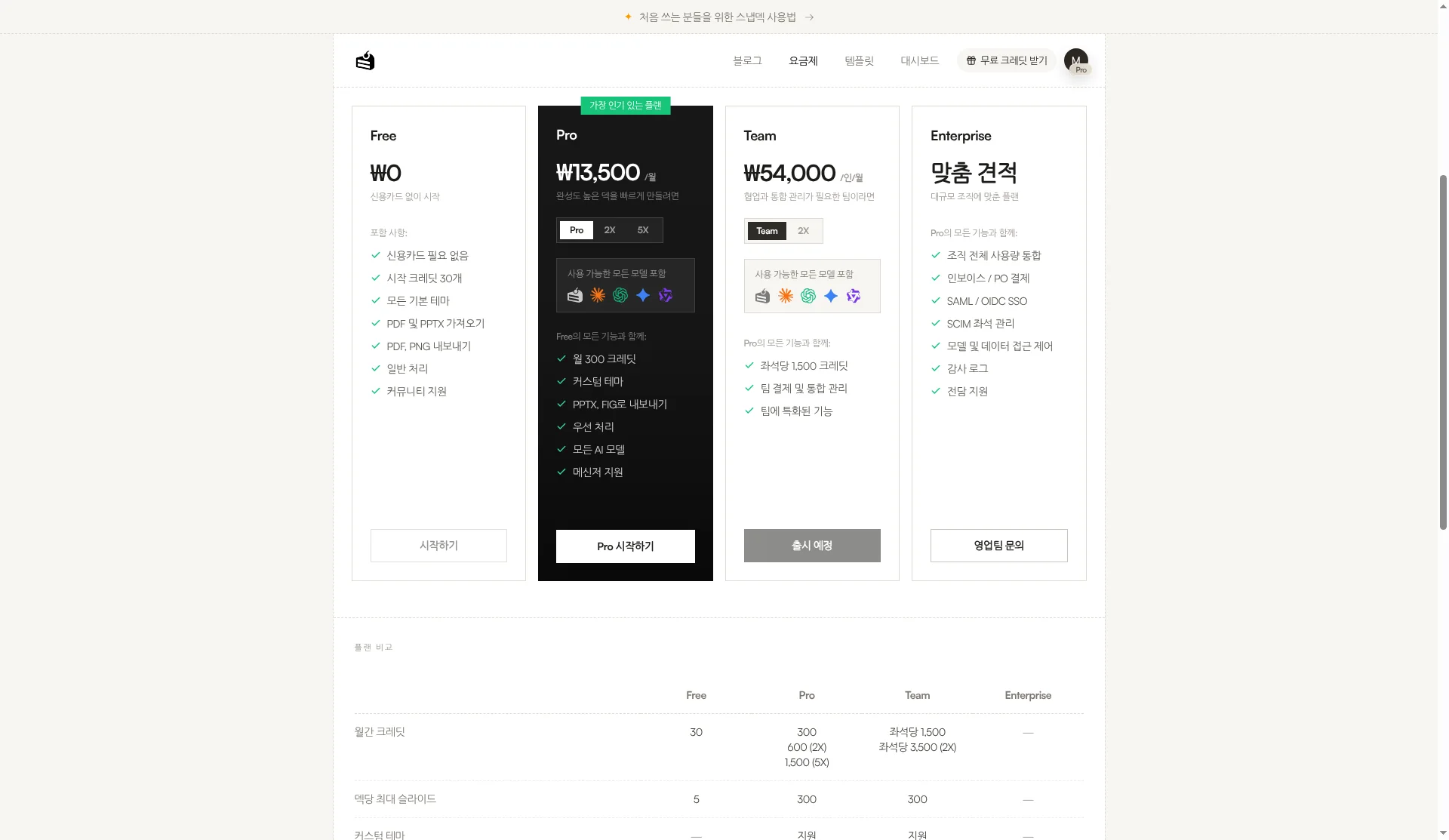
| Pricing entry | Basic $0. Paid annual: Starter US$12.25/person/mo, Business US$24.75/person/mo, Enterprise custom (pricing) | Free ₩0 (starter credits, deck limits, watermark, no PPTX/Figma). Paid export from Pro |
Where Visme fits: many formats in one visual platform
Visme’s strength—on public copy—is treating more than presentations inside one visual content platform.
- Content range. The homepage lists presentations, documents, data visualizations, social, video, and wireframes & mockups; the FAQ also mentions infographics and forms.
- AI first draft. AI Designer: text prompt → ready-to-use design. AI Presentation Maker covers style choice and customization, document/URL sourcing (with limits noted), Presenter tools, Master Layout, and Slides Library.
- Brand and interactivity. Brand Wizard (website URL) and Brand Kit; hotspots, hover, clickable menus; content calendar, asset management, and collaboration.
- Download and share. PPTX, PDF, HTML5, social schedule, password-private projects (AI page). Download formats depend on plan (see pricing below).
- AI credits wording. The AI Presentation Maker FAQ lists free 10 / Starter 200 / Pro 500 / Enterprise unlimited credits; design generation costs 2 credits, other AI tools 1. Public pricing cards use Basic / Starter / Business / Enterprise. We did not map FAQ “Pro” to pricing-card “Business” from public pages alone, and we do not invent a merged plan name. AI Designer limits (FAQ): max 10 pages; cannot generate infographics, standalone charts/graphs, whiteboards, web graphics, videos, or GIFs via AI Designer; does not crawl external sites (chatbot URL sourcing is separate, with caveats); one project at a time. The page says it uses ChatGPT and Unsplash APIs.
- Scale claims. “35M+” / “35,300,000 users” are Visme’s claims, not our ranking.
If marketing, sales, or education work needs decks plus infographics, social, documents, and video in one place, with Brand Kit and a calendar, Visme’s all-in-one axis is close.
To be honest: we found no Figma (.fig) export on public pages, we did not verify a Korean editor UI, AI Designer / document sourcing / credits have the limits above, and we do not collapse FAQ “Pro” with pricing-card “Business” from public pages alone.
Where Snapdeck fits: outline → style → canvas, then hand off the file
Snapdeck focuses on making a deck on the web and choosing how to hand it off.
The features page describes three edit paths: direct Figma-style editing, AI chat, and selecting an area to change. You compare before applying. You can regenerate designs from the same outline. Import PPTX lets you keep editing or use a file as a reference.
Export lists PDF, Images (.png), Figma (.fig), and PowerPoint (.pptx) (Pro account capture; no lock icons). A Figma handoff path did not appear in the Visme public pages we checked. The features FAQ asks you to check fonts and layout after PPTX export.
To be honest: Share exists, but real-time co-editing was not verified here; we found no infographics, social, video, forms, content calendar, live data-connected charts, or Brand Kit suite on the features page; and Free has no PPTX or Figma export.
Cost: Visme annual dollars vs Korean UI won
Visme pricing (2026-10-21, public page, annual billed USD): Basic US$0 — unlimited projects, limited templates & assets, most templates. Starter US$12.25/person/month ($147/year) — premium assets, full templates, JPG/PNG/PDF download, email & chat support. Business US$24.75/person/month ($297/year) — download as PPTX, HTML5, Video & GIF; Brand Kit, Analytics, Most Integrations; Privacy Controls. Enterprise custom — SSO, 2FA, custom subdomain, approvals, CSM, and more. The homepage FAQ says Basic has a watermark and limits downloads to JPG, PNG, and PDF; paid plans start at $12.25/month per person annually. Where the FAQ says Brand Kit / analytics for “Pro and above,” we do not merge that label with pricing-card Business; we cite Brand Kit and PPTX from the pricing cards as Business and above.
Snapdeck pricing (2026-10-21 signed-in Pro account Korean UI capture, monthly toggle): Free ₩0, Pro ₩13,500/month, Team ₩54,000/user/month. Enterprise showed custom quote. The comparison table shows PPTX/Figma export as — on Free and supported on Pro/Team. Free includes starter credits, a max slides/deck limit, and a watermark. The English pricing locale may show another currency (e.g. Pro $10/month); as in prior posts we use KRW from the Korean UI as primary. English public summary: Free $0 (30 credits, PDF/PNG export, PDF/PPTX import, watermark, max 5 slides/deck, no PPTX/Figma export); Pro $10/mo (300 credits, custom themes, PPTX/FIG export); Team 1,500 credits/seat plus team features; Enterprise SSO/SCIM.
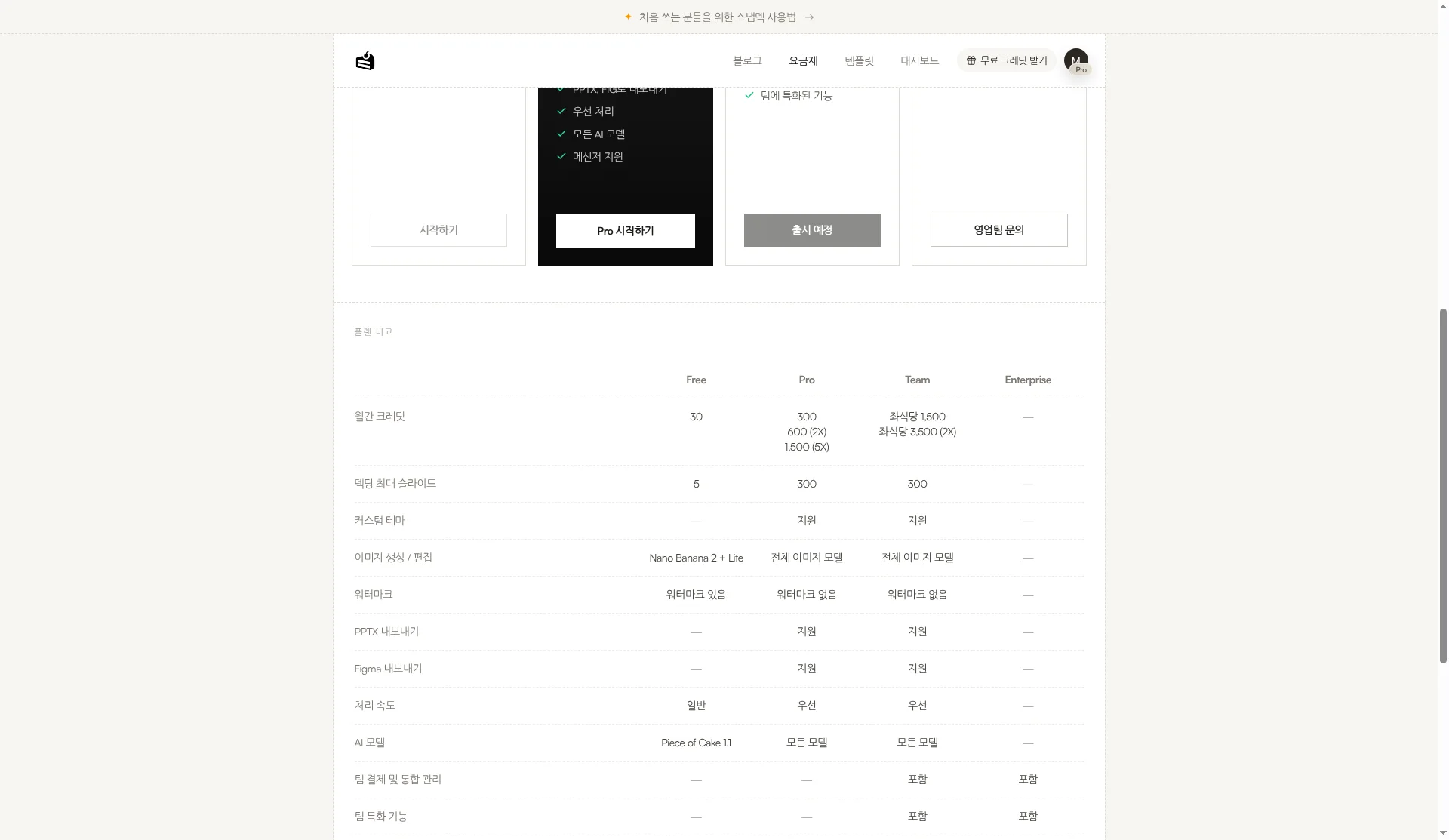
Match the subscription to whether all-in-one formats, Brand Kit, and download types are the goal—or a Figma (.fig) handoff is. Visme has plan-based download and AI credit limits; Snapdeck has credits and Free export limits—size them to deck length and handoff format.
Using both together
You do not have to pick one.
- Draft in Snapdeck from a topic or manuscript; tidy outline and style.
- Export PowerPoint (.pptx). Check fonts and layout once.
- Bring that PPT into Visme when your plan and workflow support PPTX (e.g. Business for PPTX download/share paths), then continue toward infographics, social, interactivity, or Brand Kit—or keep your own flow. The other way works too: share a Visme deck as PDF (or similar), and use Snapdeck when you need a Figma (.fig) handoff—when you have those subscriptions.
If infographics, social, video, and forms in one product are the center of the job, start with Visme alone. If Figma (.fig) is required, Snapdeck is closer.
Which to pick
Visme fits when
- You want presentations plus infographics, social, documents, and video in one place.
- Brand Kit / Brand Wizard, interactivity (hotspots, hover, and similar), and a content calendar / collaboration are part of the job (per public home copy).
- PPTX, PDF, HTML5, video/GIF, and related share paths are enough, and Figma (.fig) is not required.
Snapdeck fits when
- You want outline → style → design on a blank web canvas.
- The handoff is Figma (.fig) for a designer, or PPTX / PDF / PNG.
- You want the Korean UI and Report, Keynote, Portfolio, or Proposal styles.
Where the scope differs
Visme widens the all-in-one visual range, but we found no Figma (.fig) on public pages, no Korean in the pricing footer language switcher, and did not verify a Korean editor, and we do not overclaim AI credit / Designer limits or FAQ “Pro” vs pricing-card “Business.” Snapdeck is strong at canvas editing and Figma/PPTX handoff, but we did not find all-in-one (infographics, social, video, forms, calendar) coverage, Free blocks those exports, and real-time co-editing was not verified.
So
If the finish line is many visual formats in one platform, Visme is the natural fit. If the job is polish outline and style on the web and hand off as Figma or PPTX, Snapdeck is closer. Need both? Draft in Snapdeck, export .pptx, then look at Visme when infographics, social, or Brand Kit enter the job.
Want to start a canvas deck from one line? Try Snapdeck. ☺️
Sources: Visme home, Visme pricing, Visme AI Presentation Maker, Visme AI Design Generator, Snapdeck features (Korean), Snapdeck features (English), Snapdeck pricing. Visme from public pages checked 2026-10-21; signed-in UI not captured. Snapdeck screens captured 2026-10-21 from a signed-in Pro account in the Korean UI.