
Rehearse the delivery, or hand off the file: Decktopus vs Snapdeck
After AI builds a deck, work remains. Do you need to rehearse the talk, or is a Figma or PPTX handoff the finish line?
Decktopus pitches Studio for the deck and Loop for practice. Snapdeck is closer to build on a canvas and hand off the file.
This post splits them with one question: finish create and rehearse in one product, or build on a canvas and hand off Figma or PPTX? There is no ranking here. 🙂
Decktopus details come from its homepage, pricing page, Loop help article, and credits help, checked on 2026-10-16. We did not log in—public pages and help only. Snapdeck details come from Pro account Korean UI screens the same day plus the features and pricing pages.
They finish in different places
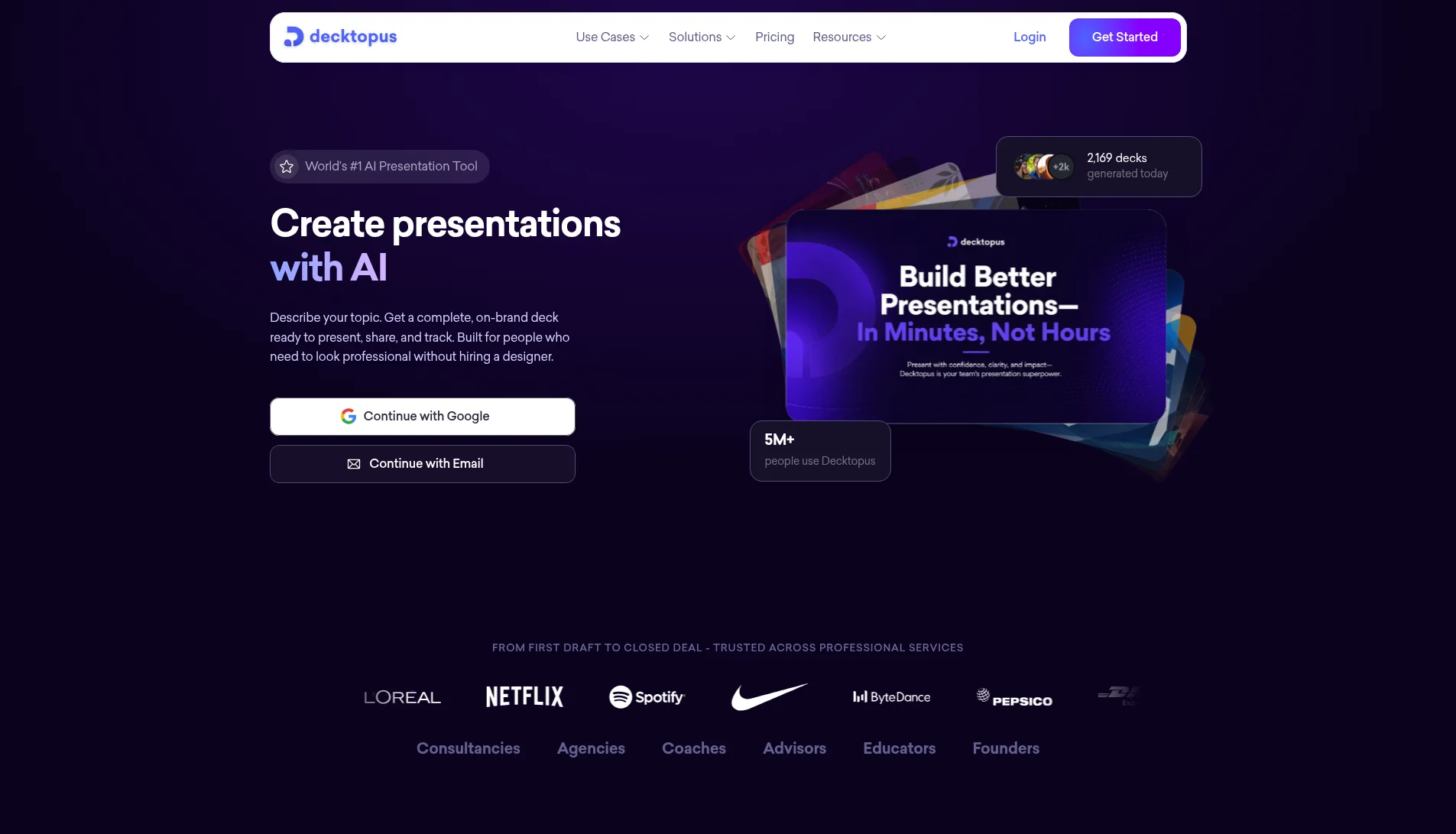
Decktopus’s homepage puts Studio and Loop side by side. In Studio you enter a topic or upload a file to get a presentation or carousel, and you can pull brand from a website URL. You edit with natural-language prompts and export PDF, PPT, and PNG.
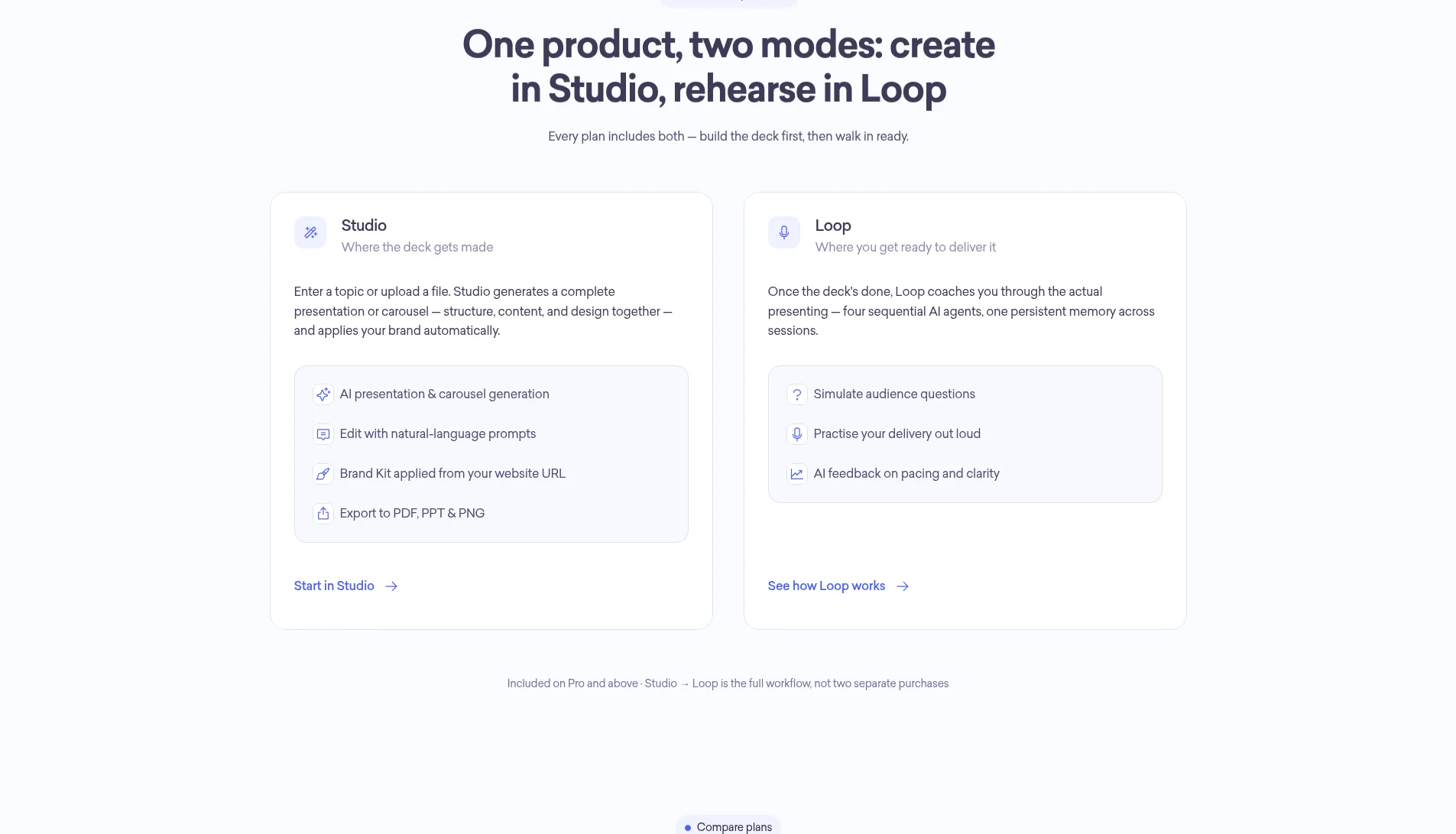
Loop is for rehearsal. Per the Loop help article, Loop sits next to Studio on the dashboard. Four agents appear: Emily the Profiler, Marcus the Architect, Red Team, and Stage. The Readiness Score runs 0–100 across Energy, Pacing, Pauses, Closing, Opening, Filler Words, Time Adherence, and Content Coverage.
Snapdeck starts in a browser prompt. On home you pick a 16:9, 4:3, or 4:5 ratio and a slide count. Underneath are Web Research, Web Scrap, Import PPTX, and Auto Agent. The features page lists three steps: enter topic and materials, review the outline, then choose a style and theme. Styles include Report, Keynote, Portfolio, and Proposal. Custom themes take colors, fonts, and a logo, or import from a website URL.
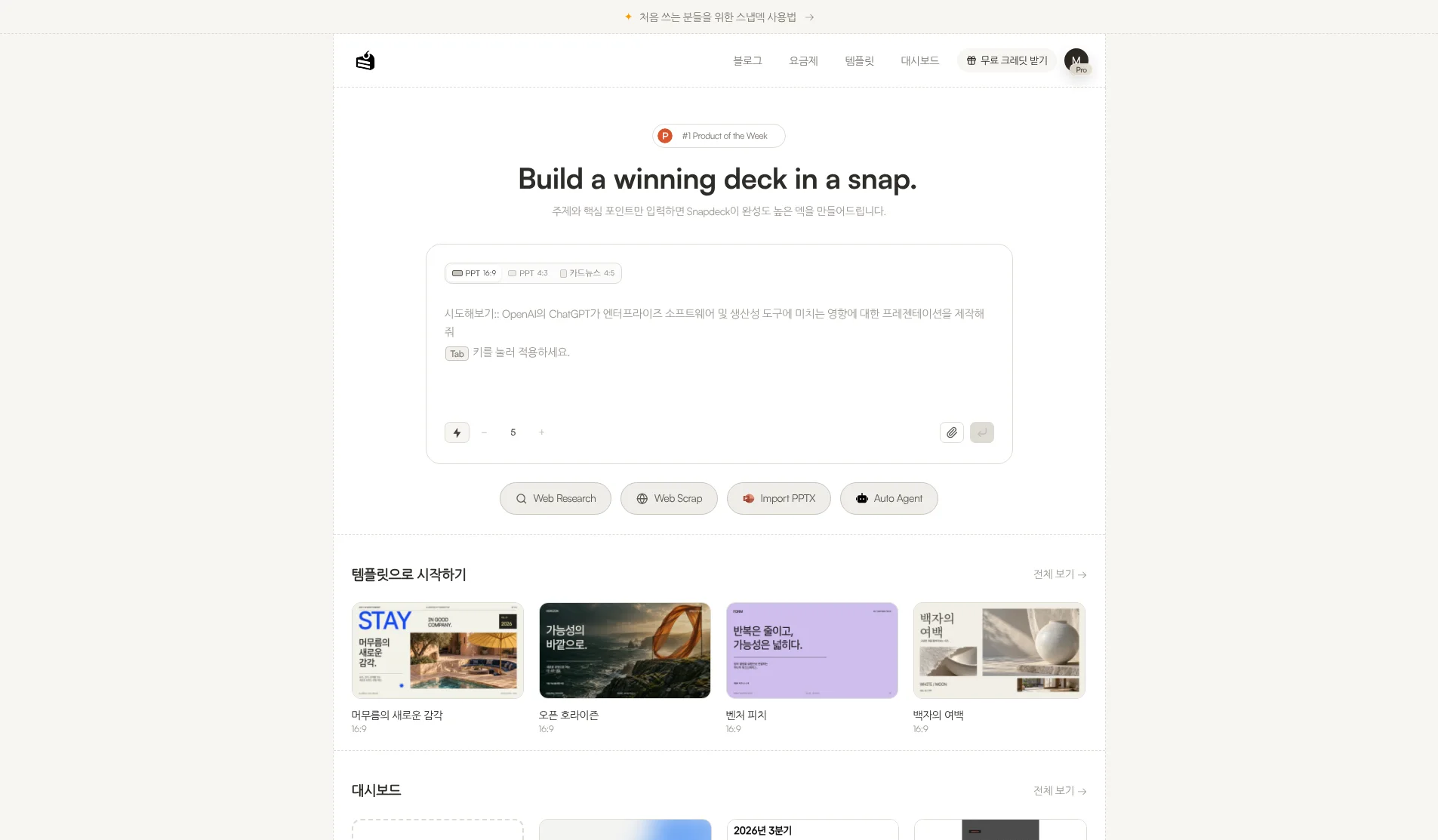
Both make decks. What differs is what you do after: Decktopus rehearses in-product; Snapdeck polishes on a canvas and hands off files. We did not find a Loop-style delivery coaching feature on Snapdeck’s features or pricing pages.
The comparison, in one pass
| Decktopus | Snapdeck | |
|---|---|---|
| Where it runs | Web (decktopus.com). Pro mentions mobile | Web browser (snapdeck.app) |
| New deck | Studio: topic or file upload → presentation or carousel. Brand from website URL | Prompt, ratio, slide count, attachments, Web Research, Web Scrap, Auto Agent. Outline before design |
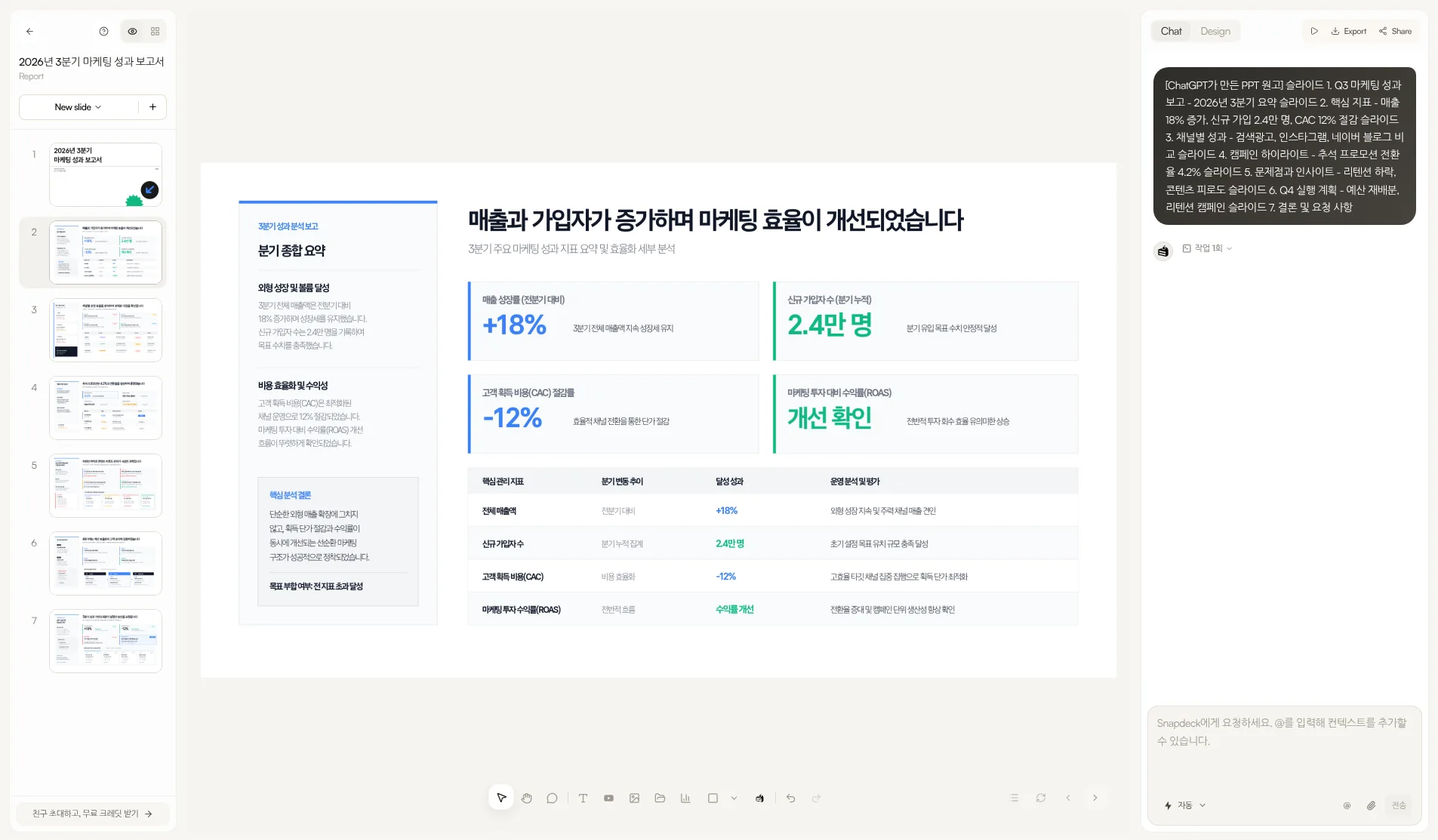
| How you edit | Natural-language prompt edits (per public copy) | Figma-style direct edit + Chat. Select an area, ask AI, compare before applying |
| Presentation practice | Loop: four agents + Readiness Score (0–100) | No rehearsal or delivery coaching found on features/pricing |
| Languages | Homepage FAQ: English, French, German, Portuguese, Spanish, Turkish, Arabic. Korean is not in that list | Captured in Korean UI. “Built by a Korean team.” No official generation-language list found |
| Working together | Business FAQ: team workspace, deck analytics, email gate, and more | Has Share. Real-time co-editing not verified |
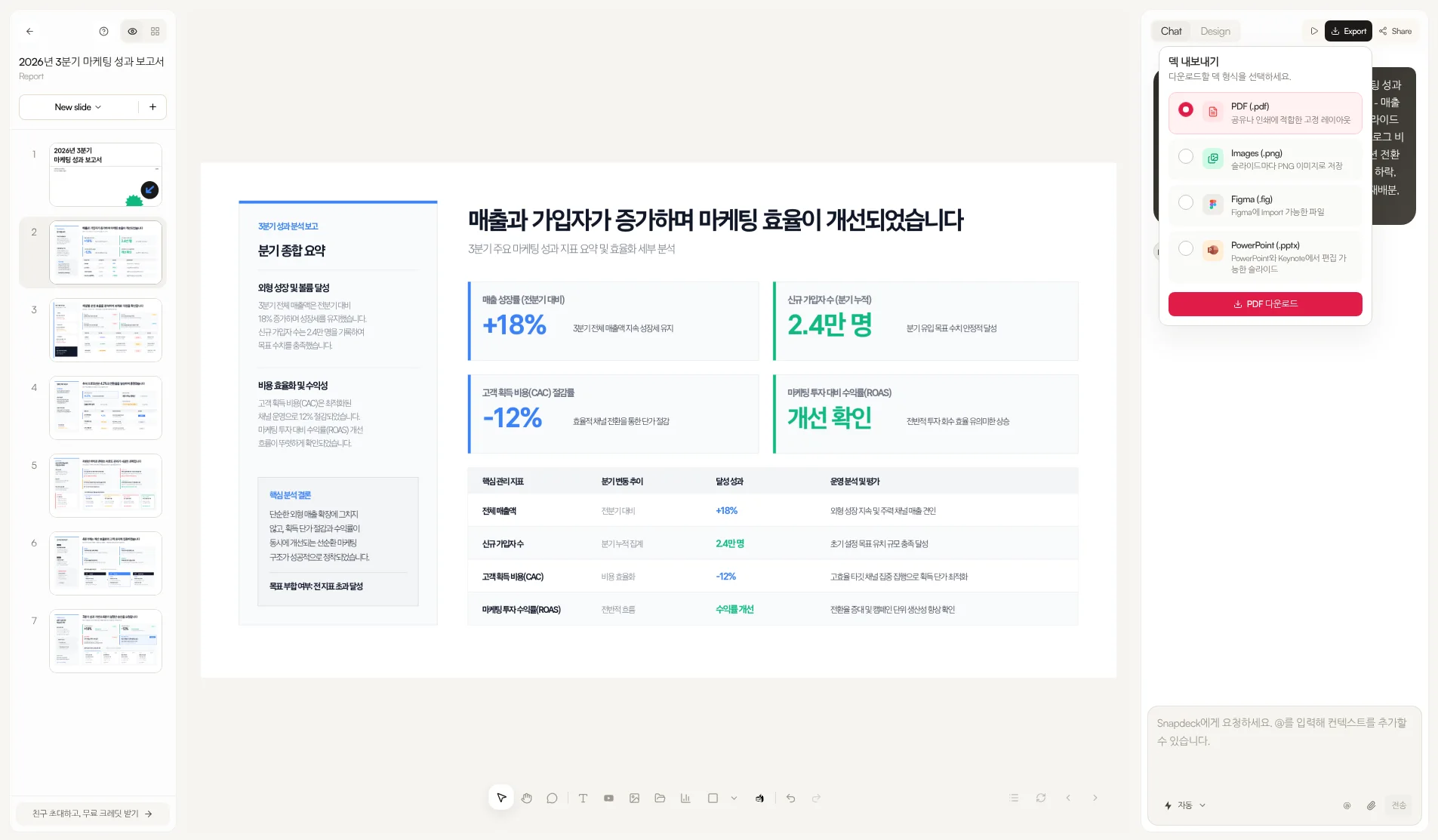
| Export | PDF, PPT, PNG (public pages). No Figma (.fig) in the public materials we checked | PDF, PNG (per slide), Figma (.fig), PowerPoint (.pptx) |
| Pricing entry | No free plan. Signup free credits for a 3-slide try | Free ₩0 (30 starter credits, 5 slides/deck, watermark, no PPTX/Figma). Paid export from Pro |
Where Decktopus fits: create, then rehearse in the same product
Decktopus’s strength is that deck creation and delivery rehearsal live in one product.
- Studio. The homepage says you build a presentation or carousel from a topic or upload, pull brand from a website URL, edit with natural language, and export PDF, PPT, and PNG.
- Loop. Per the help article, Emily (Profiler), Marcus (Architect), Red Team, and Stage give feedback, and the Readiness Score covers energy, pacing, pauses, opening, closing, filler words, time adherence, and content coverage.
- Share and analytics. Pro includes one-click sharing; the Business FAQ lists custom domain, email gate, and deck analytics.
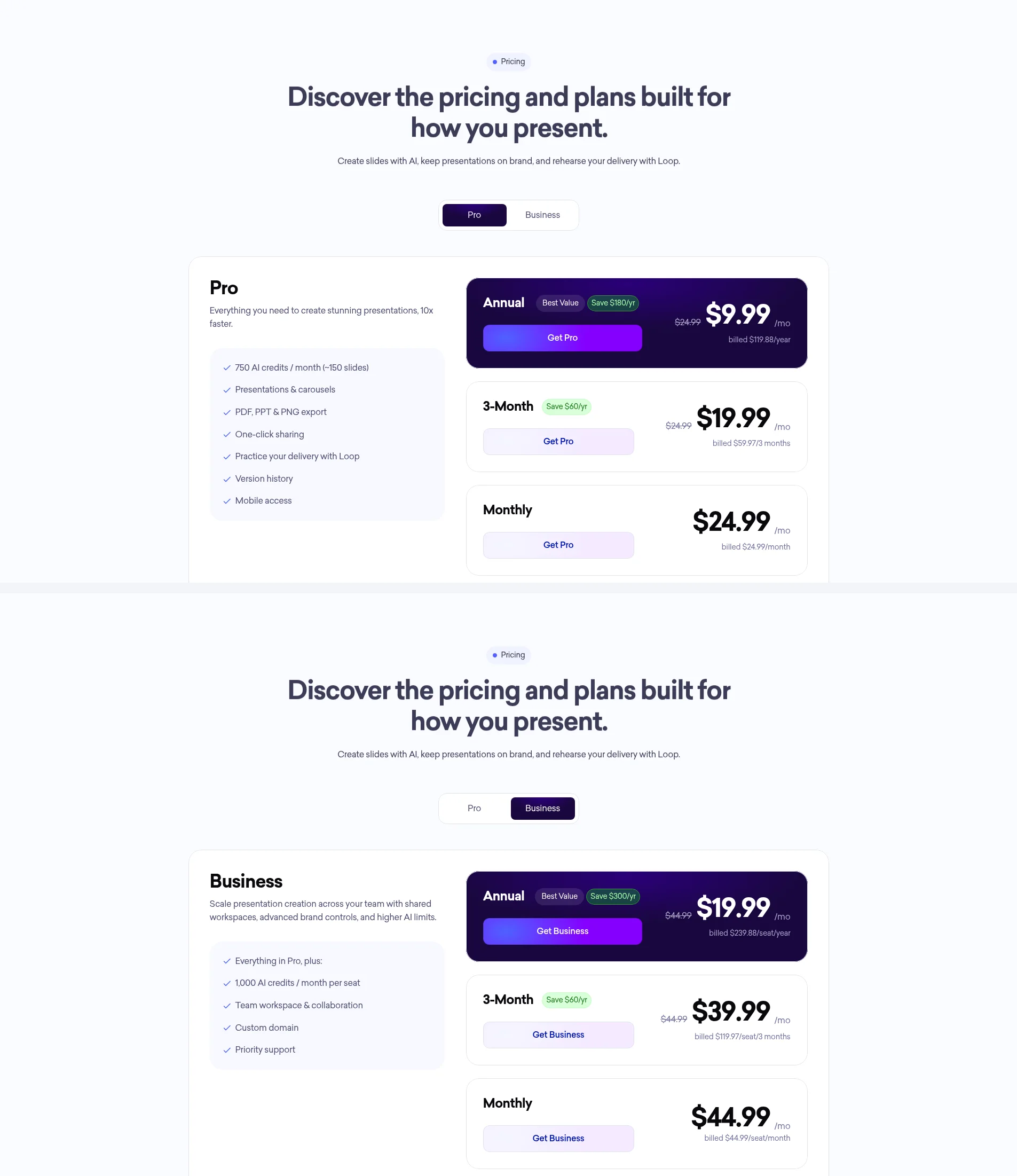
- Credits. The credits help says 5 credits per slide generation, 5 per AI/Edit Text edit, and top-up packs never expire. Pro includes 750 AI credits/month (pricing page says ~150 slides).
- Security note. The FAQ says SOC 2 Type II is “currently in progress”—not completed.
- Extras. The site mentions a ChatGPT app and an MCP server. That is a side note, not this post’s main angle.
If you want practice and AI feedback inside the same product through presentation day, Decktopus Loop sits on that axis.
To be honest: the homepage FAQ’s seven languages do not include Korean, we found no Figma (.fig) export in the public materials we checked, and there is no free plan (only signup credits for a 3-slide try).
Where Snapdeck fits: build on a canvas, then hand off the file
Snapdeck focuses on making a deck on the web and choosing how to hand it off.
The features page describes three edit paths: direct Figma-style editing, AI chat, and selecting an area to change. You compare before applying. You can regenerate designs from the same outline. Import PPTX lets you keep editing or use a file as a reference.
Export lists PDF, Images (.png), Figma (.fig), and PowerPoint (.pptx). A Figma handoff path did not appear in the Decktopus public materials we checked. The features FAQ asks you to check fonts and layout after PPTX export.
To be honest: Share exists, but real-time co-editing was not verified here; we found no Loop-style rehearsal or delivery coaching on features/pricing; and Free has no PPTX or Figma export.
Languages: separate the seven-language list from “Korean UI”
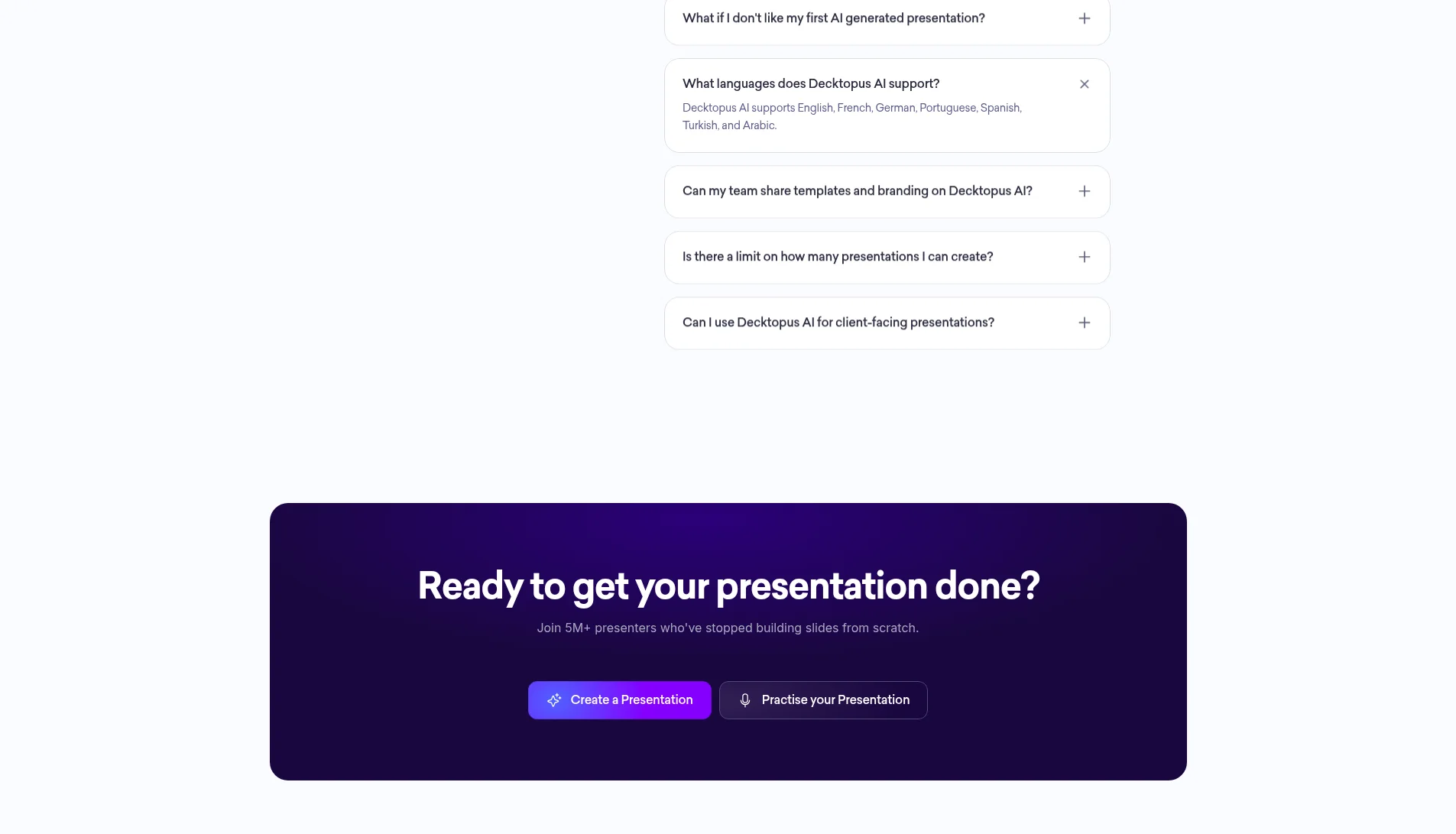
Decktopus’s homepage FAQ lists English, French, German, Portuguese, Spanish, Turkish, and Arabic. Korean is not in that list. We did not log in or run a Korean generation test, so we only report what the public FAQ lists.
Snapdeck is built by a Korean team (features page: “Built by a Korean team 🇰🇷”), and these captures use the Korean UI. We still found no official list of generation languages. For a Korean deck, a quick prompt test in each product is the safest check.
Cost: Pro dollars vs Korean UI won
Decktopus pricing (2026-10-16, public page, USD)—Pro dollar figures we confirmed: annual $9.99/month (billed $119.88/year), 3-month $19.99/month, monthly $24.99/month. Pro includes 750 AI credits/month (~150 slides per the page), presentations and carousels, PDF/PPT/PNG, one-click sharing, Loop, version history, and mobile. There is no free plan; new users get free credits at signup for a 3-slide presentation try.
Business prices on the same pricing page (toggle): annual $19.99/seat/month (billed $239.88/seat/year, shown discounted from $44.99), 3-month $39.99/seat/month, monthly $44.99/seat/month, with 1,000 AI credits per seat/month. The pricing FAQ and help list Brand Kit, custom domain, team workspace, deck analytics, and email gate.
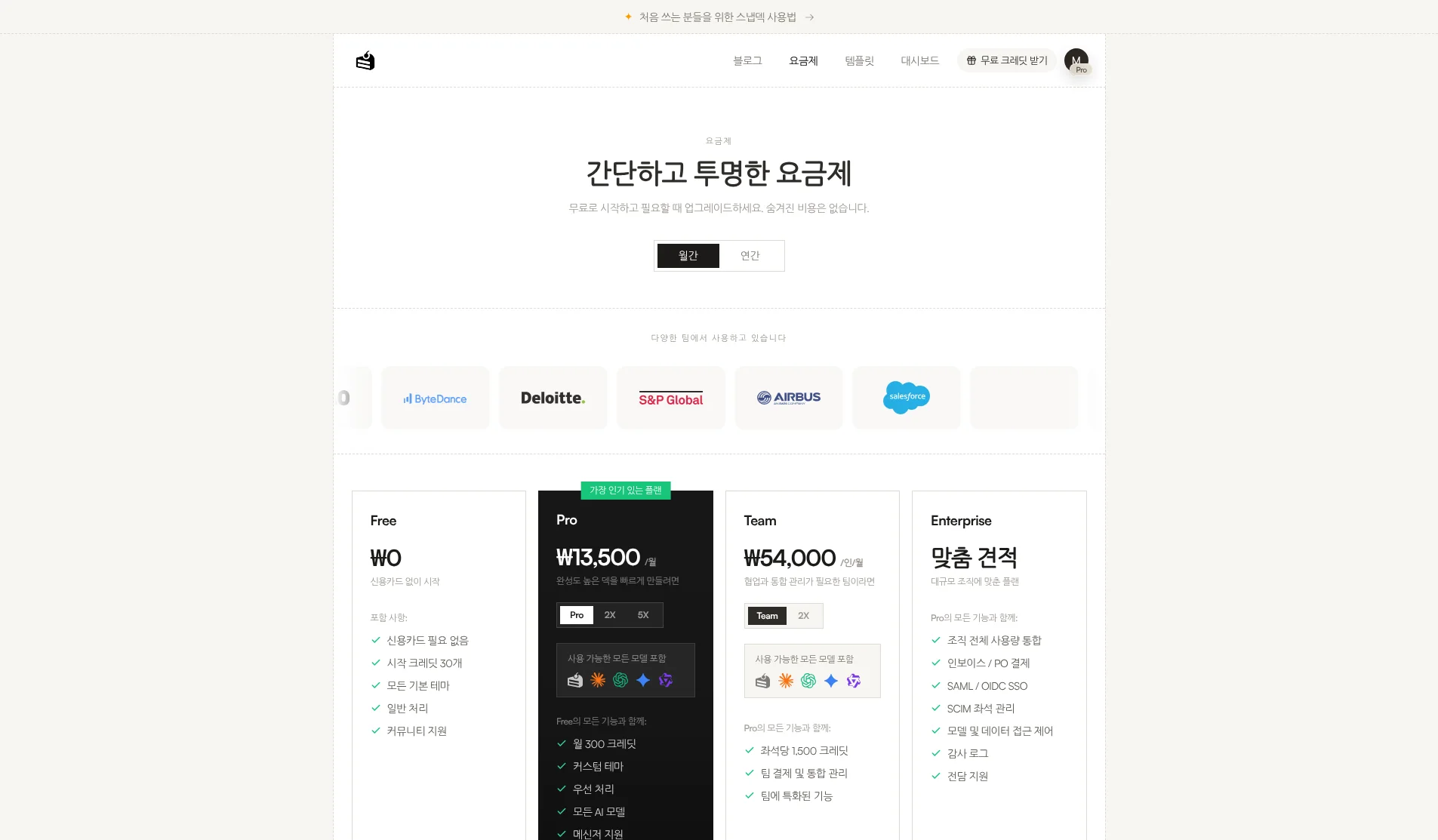
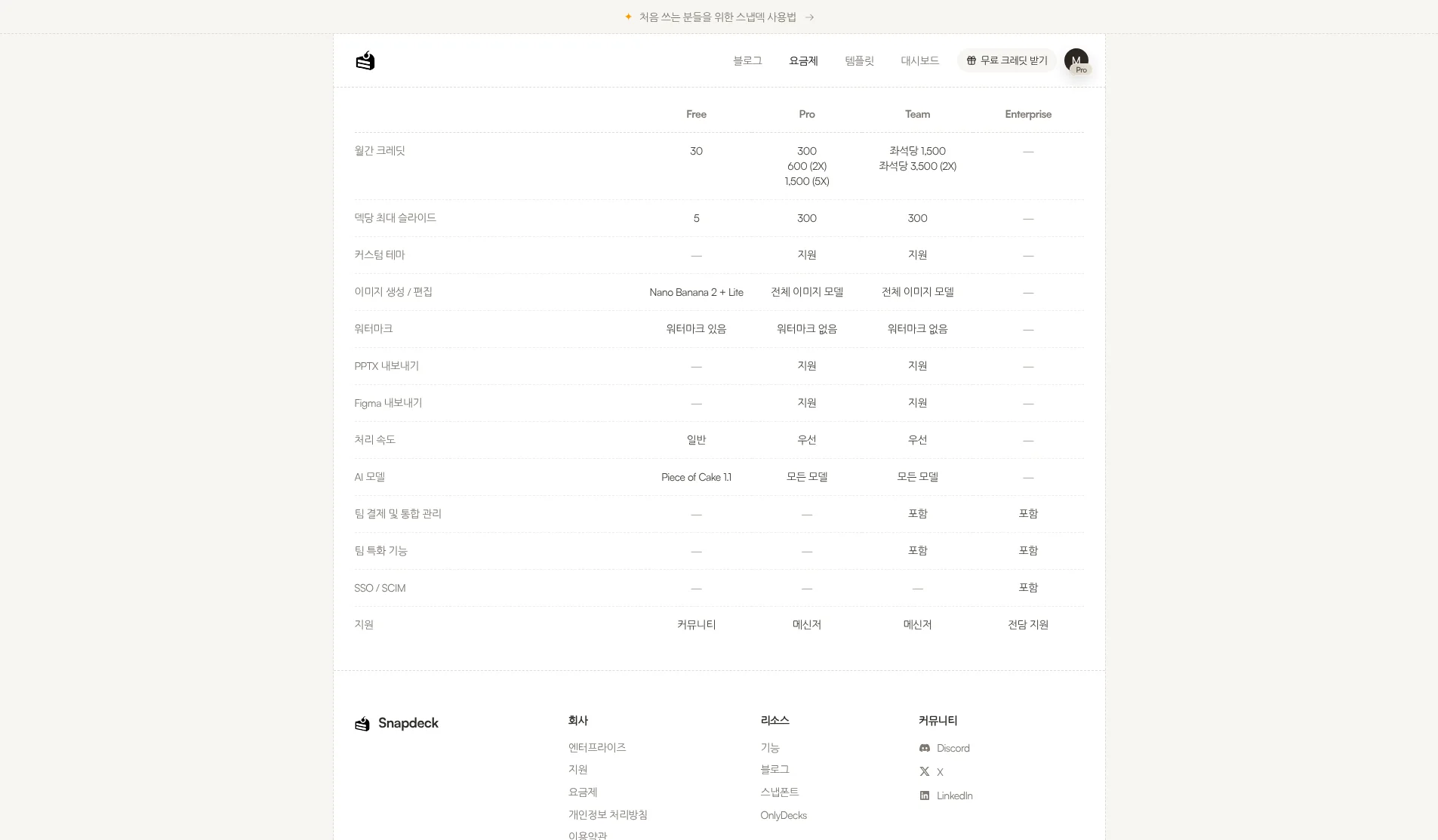
Snapdeck pricing (Korean UI capture from a Pro account, 2026-10-16): Free ₩0 (30 starter credits, 5 slides/deck, watermark, no PPTX or Figma), Pro ₩13,500/month (300 credits, with 2X and 5X options), Team ₩54,000/user/month (1,500 credits per seat), Enterprise custom. Per the comparison table, custom themes and PPTX/Figma export open on Pro and Team. The English pricing page may show different currency (e.g. Pro $10/month); as in prior posts we use KRW from the Korean UI as primary.
Match the subscription to whether rehearsal in one product is the goal, or a Figma (.fig) handoff is. Both use credit caps—size them to how long your decks usually are.
Using both together
You do not have to pick one.
- Draft in Snapdeck from a topic or manuscript; tidy outline and style.
- Export PowerPoint (.pptx). Check fonts and layout once.
- Upload that PPT into Decktopus Studio if it fits your flow (public copy supports file upload), or continue in your own workflow. When you need delivery practice, Decktopus Loop can fit—when you have that subscription.
If rehearsal is the center of the job and your language is on Decktopus’s FAQ list, start with Studio+Loop alone. If Figma (.fig) is required, Snapdeck is closer.
Which one to open
Decktopus fits when
- You want to create and rehearse (Loop AI feedback) in the same product.
- PDF, PPT, and PNG sharing is enough, and you also want brand-from-URL and carousels.
- You need the team workspace, deck analytics, or email gate listed in the Business FAQ.
Snapdeck fits when
- You want outline → style → design on a blank web canvas.
- The handoff is Figma (.fig) for a designer, or PPTX / PDF / PNG.
- You want the Korean UI and Report, Keynote, Portfolio, or Proposal styles.
Where the scope differs
Decktopus ties Studio and Loop for create-plus-rehearse, but Korean is not on the public FAQ language list, we found no Figma (.fig) export in materials we checked, and there is no free plan. Snapdeck is strong at canvas editing and Figma/PPTX handoff, but we found no Loop-style coaching, Free blocks those exports, and real-time co-editing was not verified.
So
If the finish line is rehearsing delivery inside the product, Decktopus Studio+Loop is the natural fit. If the job is build on the web and hand off as Figma or PPTX, Snapdeck is closer. Need both? Draft in Snapdeck, export .pptx, then look at Loop when practice matters.
Want to start a canvas deck from one line? Try Snapdeck. ☺️
Sources: Decktopus home, Decktopus pricing, Loop help, credits help, Snapdeck features (Korean), Snapdeck features (English), Snapdeck pricing. Decktopus from public pages and help checked 2026-10-16; signed-in UI not captured. Snapdeck screens captured 2026-10-16 from a Pro account in the Korean UI.