
Pick by what you hand off: AI presentation maker comparison of Gamma alternatives, Canva, Copilot, and 10 more
Search for an AI presentation maker and you get a long list of names. But one question decides the pick: when the deck is done, what does the next person open? A link, a PowerPoint file, or a Figma file.
So we took the 14 tools we've compared against Snapdeck on this blog and put them in one table around that single question. Whether you're looking for Gamma alternatives or just want an AI presentation maker comparison in one place, start here. No ranking—just situations. 🙂
In one line: For a link, Gamma or Pitch. To polish an existing PPT, Copilot or Plus AI. To hand off research, Genspark or NotebookLM. To shape the outline and hand off Figma or PPTX, Snapdeck.
The table and summaries only repeat what each comparison post says. Every tool is as of that post's check date (KST), so things may have changed since. Where a post didn't verify something, we wrote "not checked" instead of guessing. As new comparison posts go out, we'll add a row here and update the modified date.
What do you need to hand off? One table
| Tool (checked) | Share link | PPTX | Figma (.fig) | Site publish & other exits | On the free plan | |
|---|---|---|---|---|---|---|
| PowerPoint Copilot (Oct 12, updated Oct 28) | Co-authoring via OneDrive/SharePoint | Yes (it's a PowerPoint file from the start) | Not in the official list | Yes | Not checked · video, images, ODP | Tied to a Microsoft 365 subscription; free plan not covered in the post |
| Plus AI (Oct 14) | Whatever Slides/PowerPoint offers after generation | Yes (native PPTX, Google Slides) | Not in the sources checked | Not checked | Not checked | Paid plans start with a 7-day trial (card required); free plan not checked |
| Claude & ChatGPT for PowerPoint (Nov 18) | Whatever PowerPoint already offers (not an add-in feature) | Yes (the .pptx you have open, from the start) | Not in official docs | Not checked | Not checked · native charts and diagrams (Claude), one add-in shared with Excel and Word | Claude: not on Free (paid, Pro and up). ChatGPT: Free and Go with limited usage |
| Google Slides (Oct 7) | Yes (viewer / commenter / editor roles) | Yes | Not found | Yes | Not checked · ODP, TXT, current slide as JPEG/PNG/SVG | Slides itself is free; Gemini deck generation needs an eligible paid plan, desktop, English |
| Genspark (Oct 28) | Yes (present in browser, share link) | Yes (speaker notes included) | Format not checked (help only says "continue editing in Canva or Figma") | Yes | Not checked · Google Slides | Present and share for free, but any export needs a paid plan |
| NotebookLM / Gemini Notebook (Nov 4) | Yes (public sharing for consumer accounts; off for Workspace Enterprise/Education) | Yes (per help; editability not verified) | Not in the help | Yes | Not checked | Standard (free) can generate; help text doesn't gate download behind paid (limits vary by plan) |
| Canva (Oct 5) | Yes (view / comment / edit) | Yes (presentations only) | Not in the list | Yes (Standard, Print) | Websites (Visual Suite) · JPG, PNG, SVG, GIF, MP4 | Not checked |
| MiriCanvas (Oct 23) | Yes (link sharing, co-editing) | Yes (editable text / elements as images / single image) | Not in public docs | Yes | Not checked · PNG, JPG, MP4, GIF | 5 AI decks/month, up to 30 slides, editing and PPTX download included |
| Visme (Oct 21) | Password-protected private projects listed as a sharing option | Yes (Business and up, per pricing cards) | Not on public pages | Yes | HTML5 (Business), social scheduling · JPG, PNG, Video, GIF | Basic: watermark, JPG/PNG/PDF downloads only |
| Gamma (Sep 29) | Yes | Yes | Not in the export help list | Yes | Website publishing · PNG, Google Slides (via PPTX upload), LinkedIn | Free-workspace PDF and PPTX carry a "Made by Gamma" badge |
| Pitch (Oct 2) | Yes (share link, Pitch rooms) | Yes (paid feature) | Not in the export help | Yes | Not checked | Free PDFs may carry a Pitch watermark; PPTX is paid |
| Beautiful.ai (Sep 30) | Yes (share link, present from dashboard) | Yes (Editable PowerPoint, PowerPoint Images) | Not in the help list | Yes | Not checked · Google Slides, Offline Player, Print | Editable PowerPoint and Google Slides are Pro/Team/Enterprise only |
| Prezi (Oct 19) | Yes (share link after the session) | Yes (FAQ) | Not in public sources | Yes (Plus, per plan guide) | Not checked · QR polls, quizzes, Q&A, post-session learning | Basic free: up to 5 public projects, 500 AI credits; PPTX plan scope not checked |
| Decktopus (Oct 16) | Yes (one-click sharing, Pro) | Yes ("PPT") | Not in public sources | Yes | Not checked · PNG | No free plan; 3-slide trial credits on sign-up |
| Snapdeck (Nov 11) | View-only link (per Oct 7 post) | Yes (Pro/Team, no speaker notes) | Yes (Pro/Team) | Yes (including Free) | No site publishing · PNG per slide | PDF/PNG only, max 5 slides per deck, watermark, 30 monthly credits |
Check dates at a glance (all 2026, KST): PowerPoint Copilot Oct 12 (updated Oct 28) · Plus AI Oct 14 · Claude & ChatGPT for PowerPoint Nov 18 · Google Slides Oct 7 · Genspark Oct 28 · NotebookLM Nov 4 · Canva Oct 5 · MiriCanvas Oct 23 · Visme Oct 21 · Gamma Sep 29 · Pitch Oct 2 · Beautiful.ai Sep 30 · Prezi Oct 19 · Decktopus Oct 16. Snapdeck's share dialog follows the Google Slides comparison (Oct 7); everything else is from Nov 11 screens.
One thing the table shows: none of the 14 comparison posts confirmed a Figma (.fig) export for the other tool. On the other side, site publishing is a Gamma and Canva exit, and Snapdeck doesn't have it. For a free PPTX, the posts list MiriCanvas (5 a month) and Gamma (with a badge); Snapdeck Free stops at PDF and PNG.
Each tool in one line, by situation
Finish inside the PowerPoint or Google Slides you already use
- PowerPoint Copilot — Rewrites, summaries, and speaker notes inside your .pptx, plus company Brand kits and co-authoring. Korean is on the supported list, but Microsoft says quality is highest in English. → PowerPoint Copilot vs Snapdeck
- Plus AI — An add-on for PowerPoint and Google Slides, so the result is a native file from the start. Remix and Rewrite change layout and tone; one run caps around 20–30 slides. → Plus AI vs Snapdeck
- Claude & ChatGPT for PowerPoint — Sidebar add-ins that build and edit inside the .pptx you have open. Claude reads the slide master and makes native charts, on paid plans (Pro and up); ChatGPT opens on Free with limited usage. → Claude & ChatGPT for PowerPoint vs Snapdeck
- Google Slides (Gemini) — Free, strong at real-time co-editing, roles, and presenter view. Full-deck generation with Gemini is desktop, English, and eligible paid plans only. → Google Slides vs Snapdeck
Draft from research or your own sources
- Genspark — An agent researches, structures, and designs, then exports PPTX with speaker notes or Google Slides. No exports on Free. → Genspark vs Snapdeck
- NotebookLM (Gemini Notebook) — A Slide Deck grounded in your uploaded sources; present in-app or download PDF or PPTX. Revisions regenerate a new deck. → NotebookLM vs Snapdeck
Make other designs next to the deck
- Canva — Presentations next to social, video, docs, and websites, with Brand Kit and Canva Live audience tools. The pick if you need MP4 or GIF. → Canva vs Snapdeck
- MiriCanvas — AI drafts on Korean-style templates and assets, with PPTX on the free plan (5 a month, up to 30 slides). → MiriCanvas vs Snapdeck
- Visme — Infographics, social, and video in one platform, with interactivity and an HTML5 exit. PPTX starts at Business on the pricing cards. → Visme vs Snapdeck
Send a link and work as a team
- Gamma — Web cards built for links, website publishing, and LinkedIn, with PDF, PNG, and PPTX too. → Gamma vs Snapdeck
- Pitch — Real-time co-editing, guest roles, client-facing Pitch rooms, and engagement analytics. → Pitch vs Snapdeck
- Beautiful.ai — Smart Slides auto-align layouts, and locked themes keep team branding in place. → Beautiful.ai vs Snapdeck
Run the room or rehearse in the same product
- Prezi — Polls, quizzes, and Q&A from one QR code, then flashcards and self-tests after the session. → Prezi vs Snapdeck
- Decktopus — Build in Studio, rehearse in Loop with four AI agents and a Readiness Score. Korean isn't on its FAQ language list. → Decktopus vs Snapdeck
Shape the outline, then hand off PPTX or Figma
- Snapdeck — Outline → style and theme → canvas edits → PDF, PNG, Figma (.fig), or PPTX. Step by step below.
How it works in Snapdeck: input → outline & style → generate & edit → export
Today (2026-11-11) we ran a short deck on this post's own topic with a Snapdeck Pro account in the Korean UI.
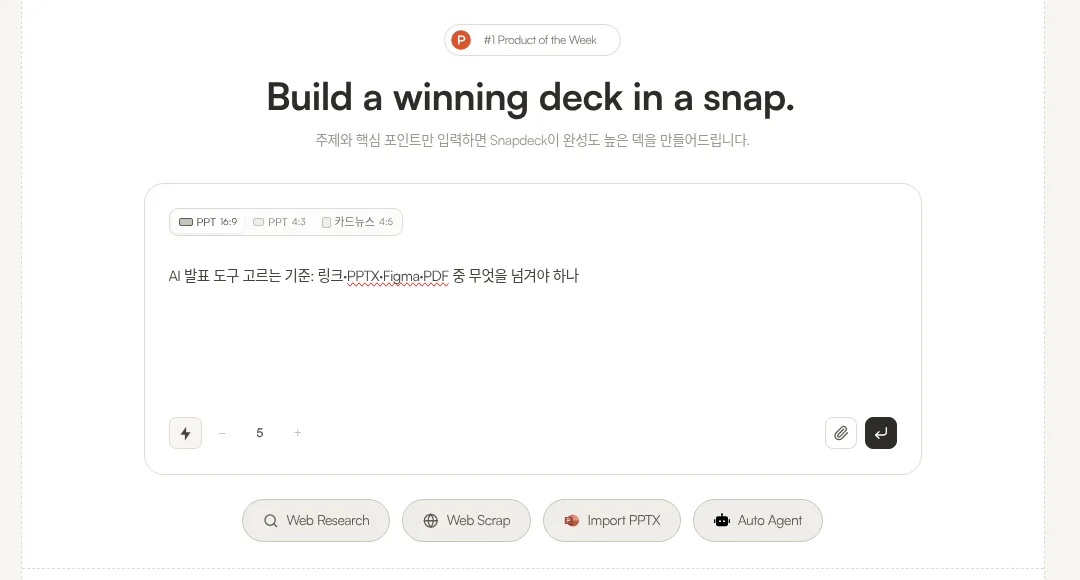
1. Input. On home, pick a ratio (PPT 16:9 or 4:3, card news 4:5) and slide count, then type a prompt. Web Research, Web Scrap, Import PPTX, Auto Agent, and file attachments are there too.
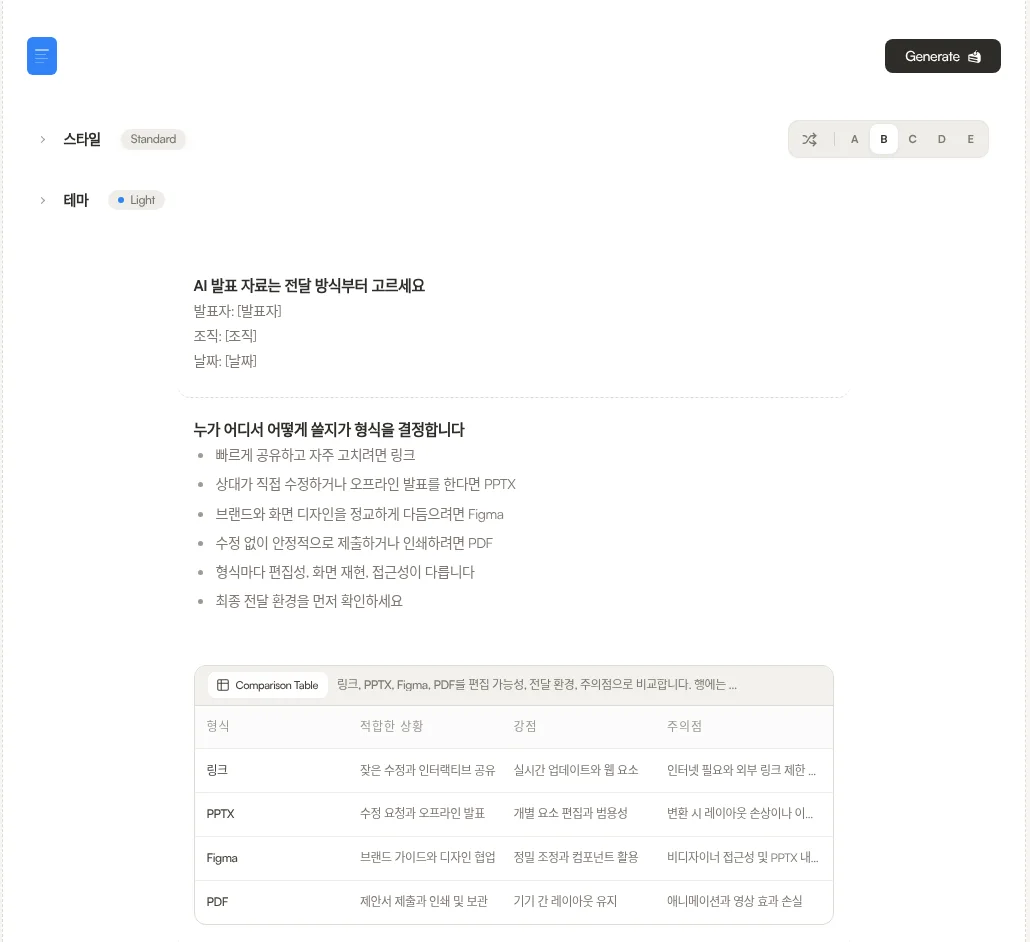
2. Outline and style. Slides don't appear right away. You get an outline with each slide's title and content first. On the same screen you pick a style (variants A–E) and a theme, edit the outline, then hit Generate. Custom themes start on Pro.
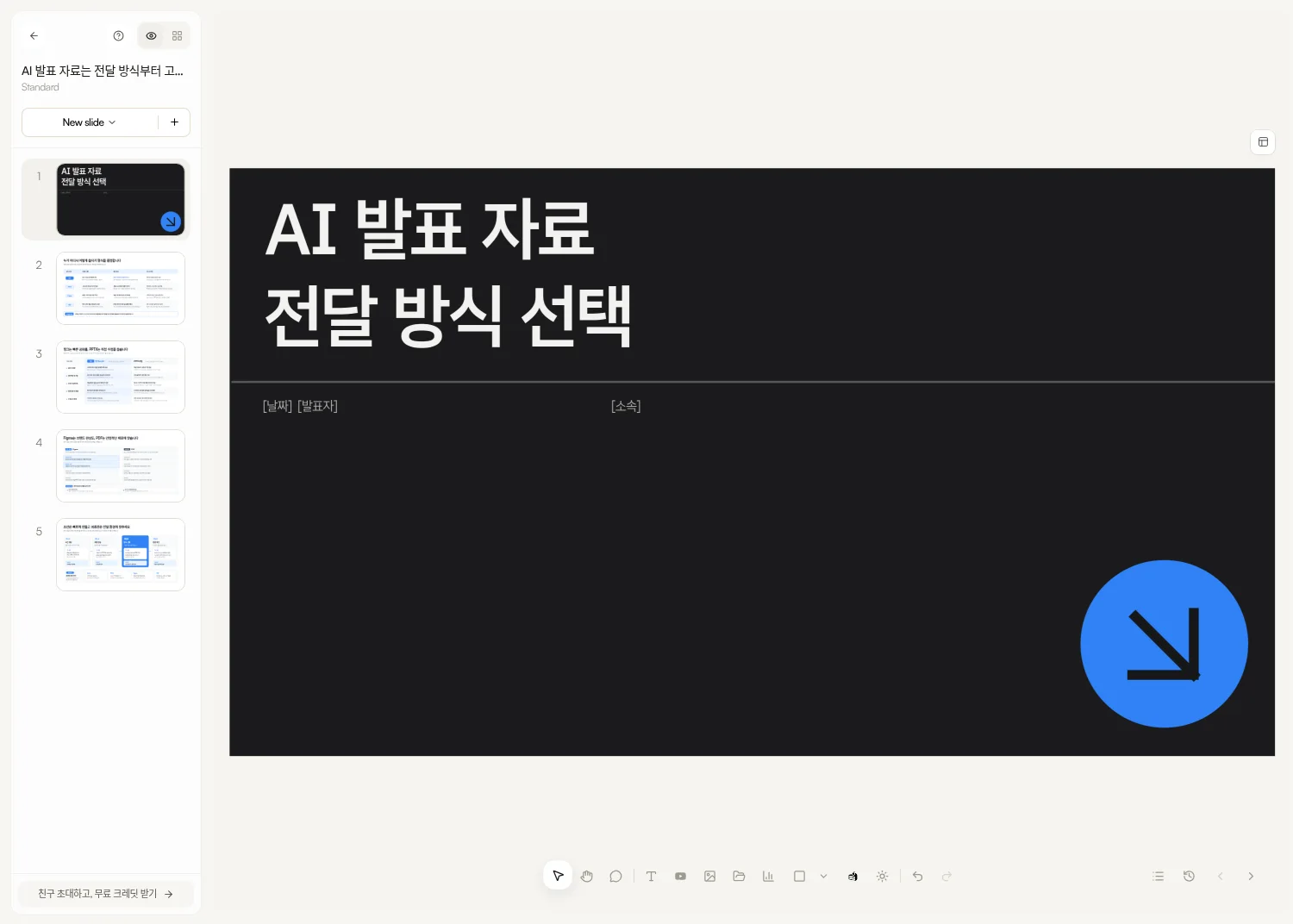
3. Generate and edit. The editor has thumbnails on the left, the canvas in the middle, and Chat/Design on the right. Edit text and shapes directly or ask in Chat.
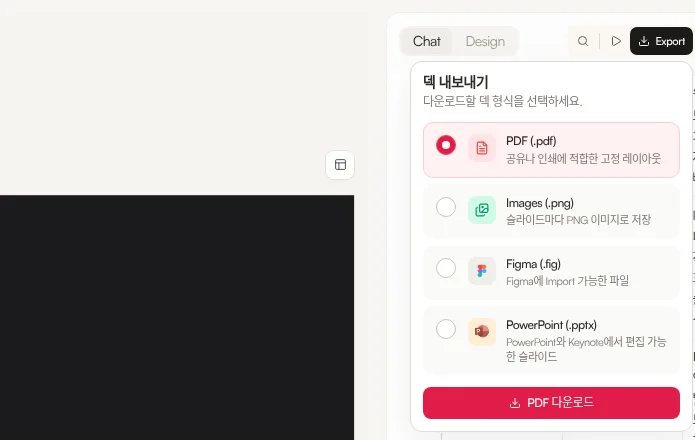
4. Export. Four options: PDF (.pdf), Images (.png), Figma (.fig), and PowerPoint (.pptx). The menu labels Figma as "a file you can import into Figma" and PowerPoint as "slides editable in PowerPoint and Keynote." More on PPTX in PPTX import and export, and on what a Figma handoff looks like in Figma export.
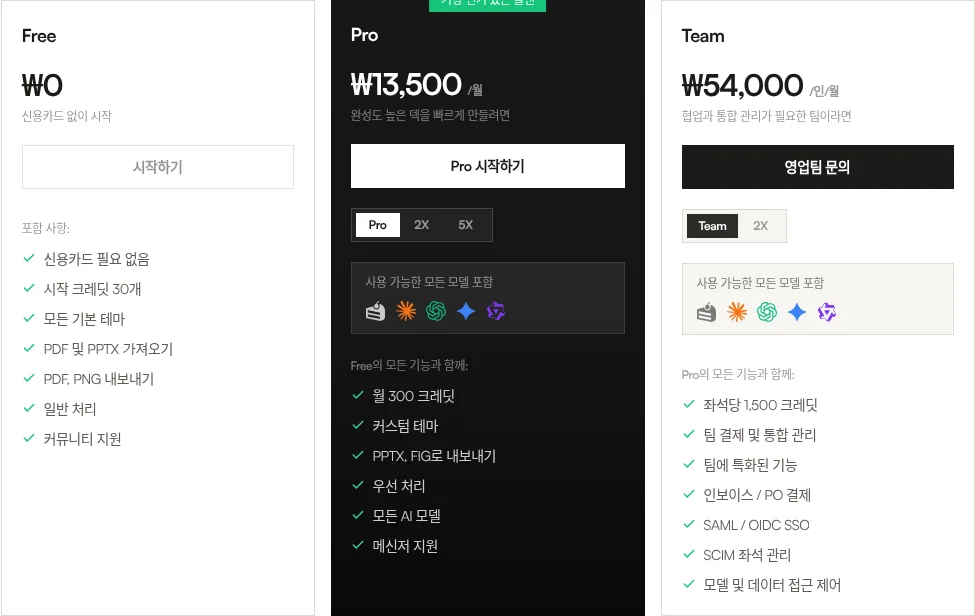
Pricing is Free ₩0 / Pro ₩13,500/month / Team ₩54,000/user/month, with PPTX and Figma export on Pro and Team. Free includes PDF and PNG export, 30 monthly credits, a 5-slide cap per deck, and a watermark.
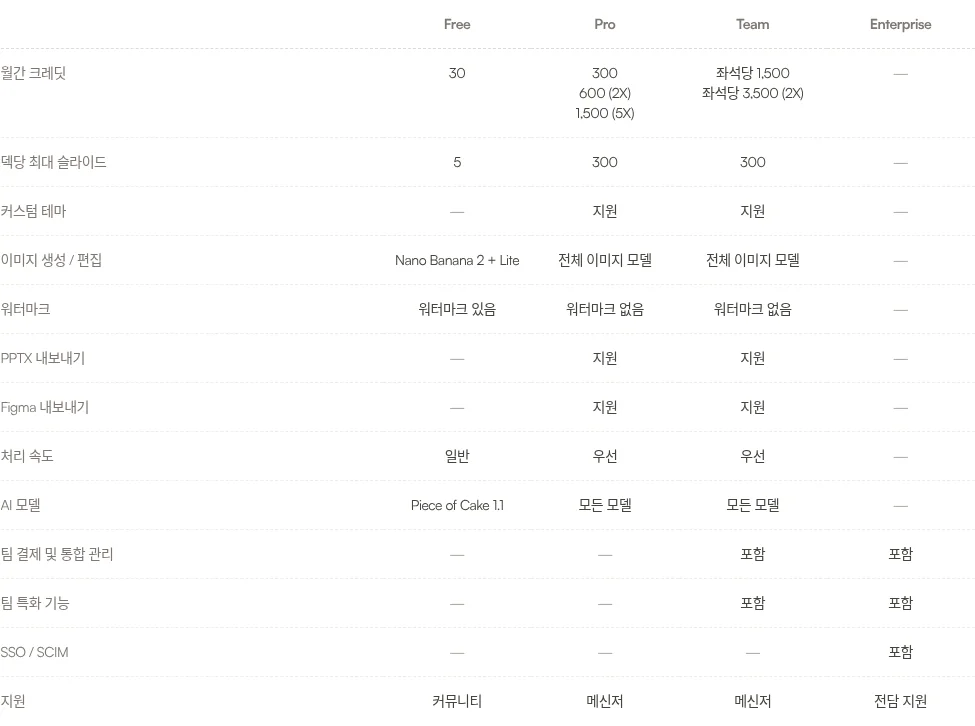
To be honest: Snapdeck blocks PPTX and Figma on Free, puts no speaker notes in PPTX, and has no site publishing. Sharing is a view-only link (per our Oct 7 post), and our comparison posts haven't confirmed real-time co-editing. There's no MP4/GIF exit and no Google Slides export either.
How to pick
Narrow it down with a few questions.
Does the next person only need a link? Gamma goes as far as a published website, Canva covers websites among many designs, and Pitch adds client rooms and engagement analytics. Snapdeck's link is view-only with no site publishing, so those tools reach further here.
Does it have to end inside company PowerPoint? If you already run Microsoft 365 and files live in SharePoint, PowerPoint Copilot. If native files should land straight in Google Slides or PowerPoint, Plus AI. If several people edit at once and you need presenter view, Google Slides is strong.
Do you need speaker notes inside the PPTX? Genspark says notes are included in PPTX, and Pitch's PowerPoint export help lists speaker notes as supported. Copilot writes notes inside PowerPoint. Snapdeck's PPTX has none.
Do you need a PPTX without paying? The posts list MiriCanvas (5 a month, up to 30 slides) and Gamma (with a badge). NotebookLM's help didn't gate downloads behind a paid plan either. Snapdeck Free stops at PDF and PNG.
Is live audience response or rehearsal the point? QR polls and quizzes: Prezi. AI rehearsal: Decktopus Loop. We didn't find these in Snapdeck.
Do you have to hand a Figma file to a designer? In this table, Snapdeck is the only tool with a confirmed Figma (.fig) export (Pro and Team). If the finish line is shaping the outline, editing on a canvas, and handing off PPTX or Figma, Snapdeck is closer.
So
The answer to an AI presentation maker comparison isn't "which one wins." It's "what does the next person open?" A link: Gamma, Pitch, Canva. Company PowerPoint: Copilot, Plus AI. Research first: Genspark, NotebookLM. The room itself: Prezi, Decktopus. And if you need to shape the outline yourself and hand off Figma or PPTX, Snapdeck.
Want to start from one line and shape the outline first? Try Snapdeck. ☺️
See also
Source posts (checked, KST): Gamma 2026-09-29, Beautiful.ai 2026-09-30, Pitch 2026-10-02, Canva 2026-10-05, Google Slides 2026-10-07, PowerPoint Copilot 2026-10-12 (updated 2026-10-28), Plus AI 2026-10-14, Decktopus 2026-10-16, Prezi 2026-10-19, Visme 2026-10-21, MiriCanvas 2026-10-23, Genspark 2026-10-28, NotebookLM 2026-11-04, Claude & ChatGPT for PowerPoint 2026-11-18. Official vendor sources are linked at the end of each post. We didn't re-check vendor pages for this hub; Snapdeck screens and pricing were captured from a signed-in account on 2026-11-11.